Crystal structure search
Polymorphism is a common phenomenon observed in organic molecules. CONFLEX can explore possible crystal structures of an organic molecule including both packing and conformational polymorphs, using the original algorithm [Ishii, H., Obata, S., Niitsu, N. et al. Sci. Rep. 10, 2524 (2020).].
[Crystal structure search from a structural formula]
The Cambridge Crystallographic Data Centre (CCDC) regularly conducts blind tests of crystal structure prediction (CSP) [P.M. Lommerse, et al, Acta Cryst. B56, 697-714, 2000]. To explain crystal structure prediction using the CONFLEX program, we use 5-cyano-3-hydroxythiophene (II), which was used in the CSP blind test (see the figure below).
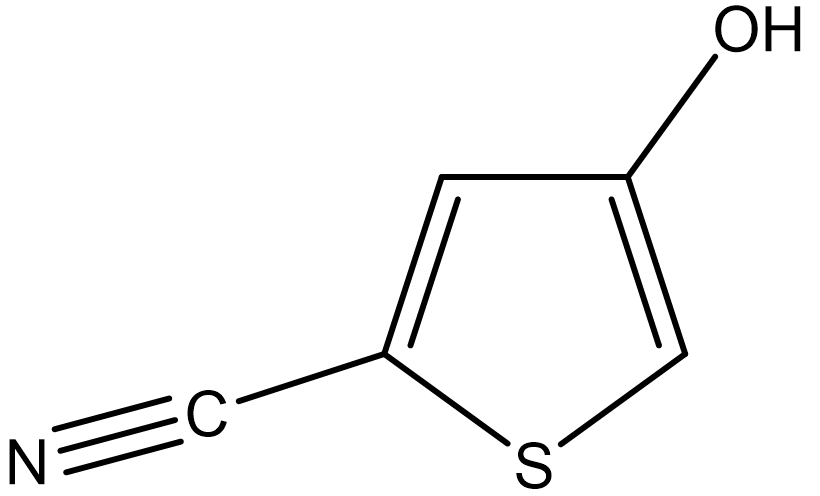
First, we create a molecular file for II using PerkinElmer ChemDraw software. For instructions on how to use ChemDraw, please refer to its user manual.
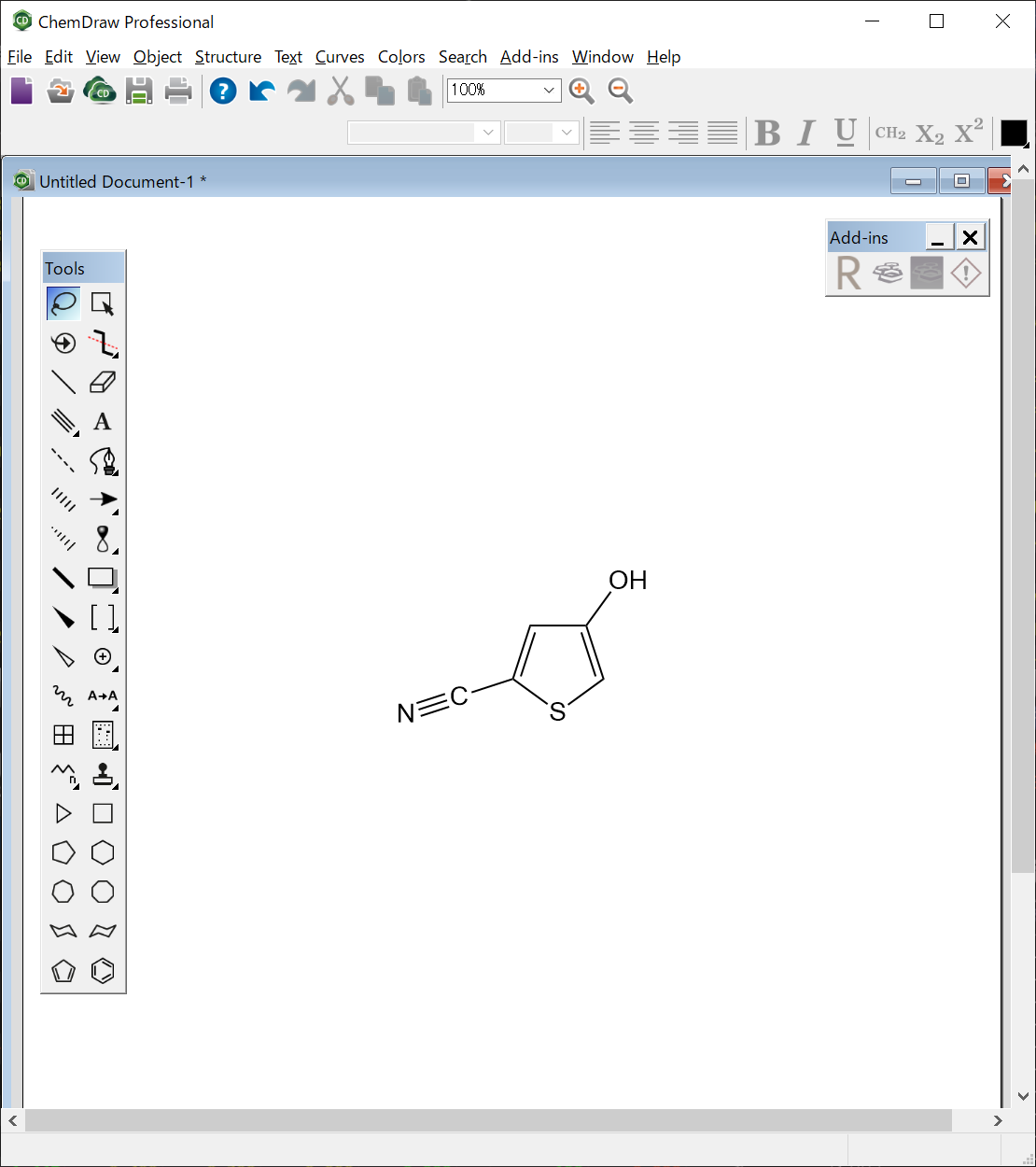
The molecular file for II is saved as “II.mol” in the MDL MOL file format.
II.mol file
II.mol
ChemDraw08301910352D

  8  8  0  0  0  0  0  0  0  0999 V2000
    0.2633    0.3011    0.0000 C   0  0  0  0  0  0  0  0  0  0  0  0
    1.0883    0.3011    0.0000 C   0  0  0  0  0  0  0  0  0  0  0  0
    0.0083   -0.4836    0.0000 C   0  0  0  0  0  0  0  0  0  0  0  0
    0.6758   -0.9685    0.0000 S   0  0  0  0  0  0  0  0  0  0  0  0
    1.3432   -0.4836    0.0000 C   0  0  0  0  0  0  0  0  0  0  0  0
    1.5732    0.9685    0.0000 O   0  0  0  0  0  0  0  0  0  0  0  0
   -0.7763   -0.7385    0.0000 C   0  0  0  0  0  0  0  0  0  0  0  0
   -1.5732   -0.9520    0.0000 N   0  0  0  0  0  0  0  0  0  0  0  0
  1  2  1  0
  1  3  2  0
  3  4  1  0
  4  5  1  0
  5  2  2  0
  2  6  1  0
  3  7  1  0
  7  8  3  0
M  END
Next, we optimize the structure of single molecule of II.
[Running from the Interface]
Open the II.mol file using CONFLEX Interface.
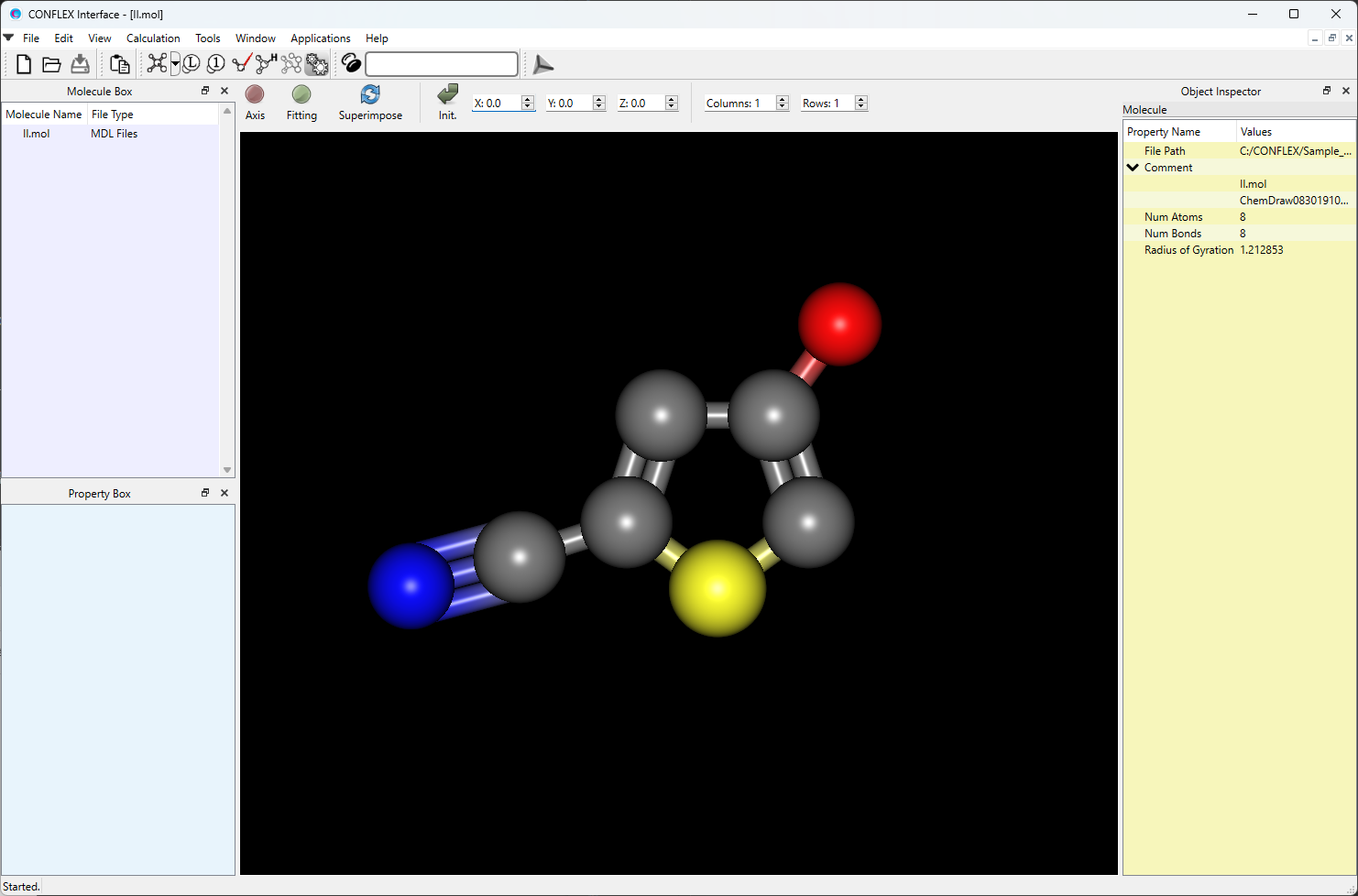
Select [CONFLEX] from the Calculation menu, and then click in the calculation setting dialog that appears. This will be started the geometry optimization of II.

[Running from the command line]
Save the II.mol file in a folder, and then execute the following command. This will be started the geometry optimization of II. If an ini file is not provided, CONFLEX will perform the optimization using the default settings.
C:\CONFLEX\bin\conflex-10b.exe -par C:\CONFLEX\par -inp II.molenter
The command above is for Windows OS. For other OS, please refer to [How to execute CONFLEX].
Next, we perform a conformation search for II.
[Running from the Interface]
Open the II-F.mol file using CONFLEX Interface.
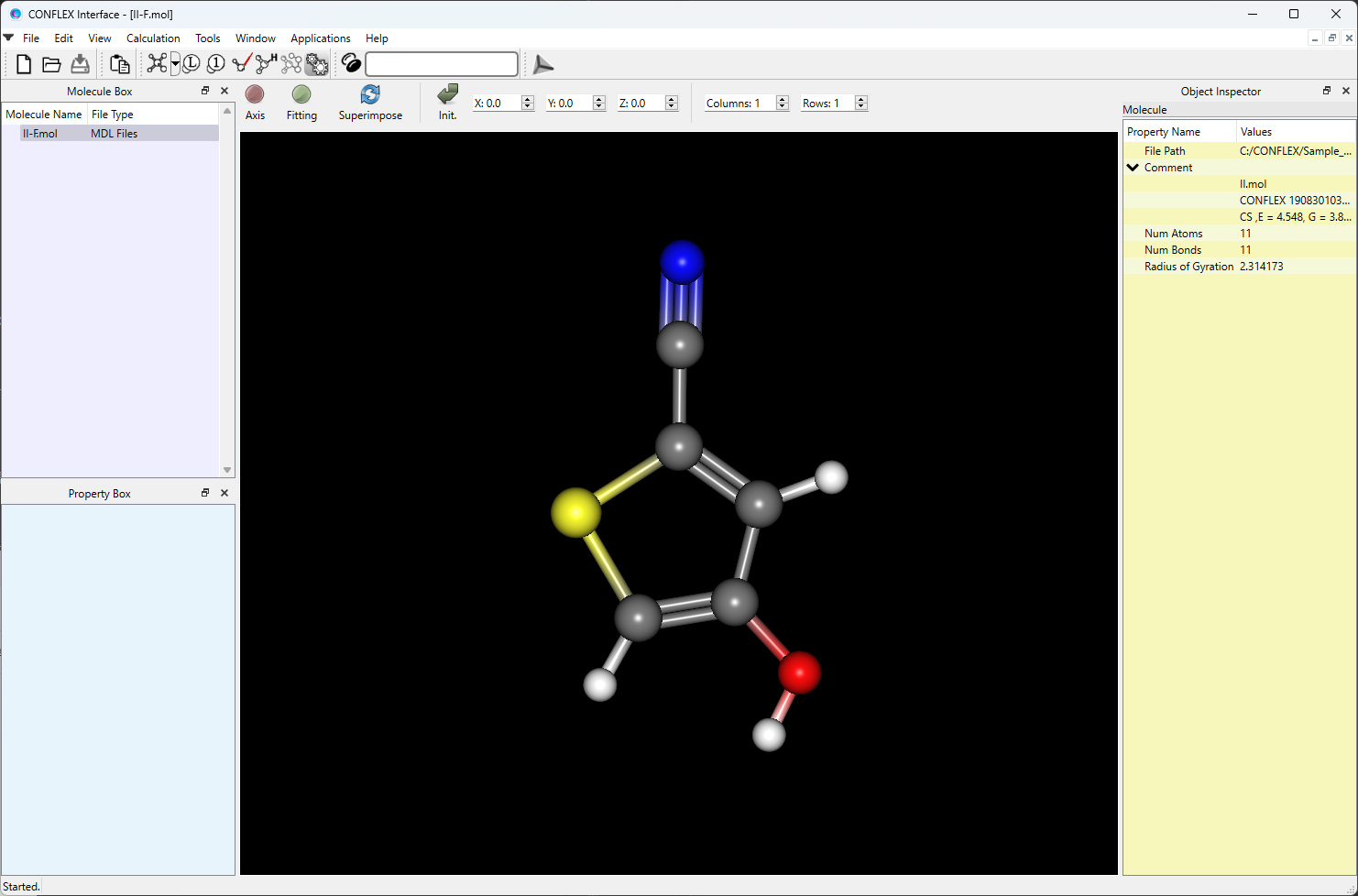
Select [CONFLEX] from the Calculation menu, and select [Conformation Search] from the [Calculation Type:]
pull-down menu on the calculation setting dialog that appears.
Edit the value of [Search Limit:] to 10.0. This parameter is used as a criterion for selecting the initial
structures in the conformational search.
After completing the calculation settings, click to start the
calculation.

[Running from the command line]
The calculation settings are defined by specifying keywords in the II-F.ini file.
II-F.ini file
CONFLEX SEL=10.0
[CONFLEX] means that the conformation search is performed.
[SEL=10.0] means that the search limit, which is used as a criterion for selecting the initial structure in
the conformation search, is set to 10.0 kcal/mol.
Store the two files of II-F.mol and II-F.ini in a single folder, and execute the following command to start the calculation.
C:\CONFLEX\bin\conflex-10b.exe -par C:\CONFLEX\par -inp II-F.molenter
The command above is for Windows OS. For other OS, please refer to [How to execute CONFLEX].
After the conformation search, we obtain two conformers of II. Here, we use the second most stable conformer
for the crystal structure search calculation.
We extract the structure data of the selected conformer from the “II-F.sdf” file and save it as
“II-c2.mol”. The II-F.sdf file is located in the folder containing the II-F.mol file. If you
performed the conformational search using the Interface, the file name may be II-F_conv.sdf.
II-c2.mol file
II.mol
CONFLEX 19083010373D 1   1.00000     4.54816     1
CS  ,E =       4.548, G = 0.974E-10, P =  48.3970, M( 0), IFN =00000002-00000001
 11 11  0     0               999 V2000
    1.1214   -0.0104    0.0000 C   0  0  0  0  0
    0.7822   -1.3858    0.0000 C   0  0  0  0  0
   -0.0000    0.7946   -0.0000 C   0  0  0  0  0
   -1.4433   -0.1296   -0.0000 S   0  0  0  0  0
   -0.5732   -1.6069    0.0000 C   0  0  0  0  0
    1.6924   -2.3749    0.0000 O   0  0  0  0  0
    0.0137    2.2245   -0.0000 C   0  0  0  0  0
    0.0454    3.3854   -0.0000 N   0  0  0  0  0
    2.1374    0.3665    0.0000 H   0  0  0  0  0
   -1.1076   -2.5464    0.0000 H   0  0  0  0  0
    1.2623   -3.2477    0.0000 H   0  0  0  0  0
  1  2  1  0     0
  1  3  2  0     0
  3  4  1  0     0
  4  5  1  0     0
  5  2  2  0     0
  2  6  1  0     0
  3  7  1  0     0
  7  8  3  0     0
  1  9  1  0     0
  5 10  1  0     0
  6 11  1  0     0
M  END
Next, we perform a crystal structure search of II.
[Running from the Interface]
Open the II-c2.mol file using CONFLEX Interface.
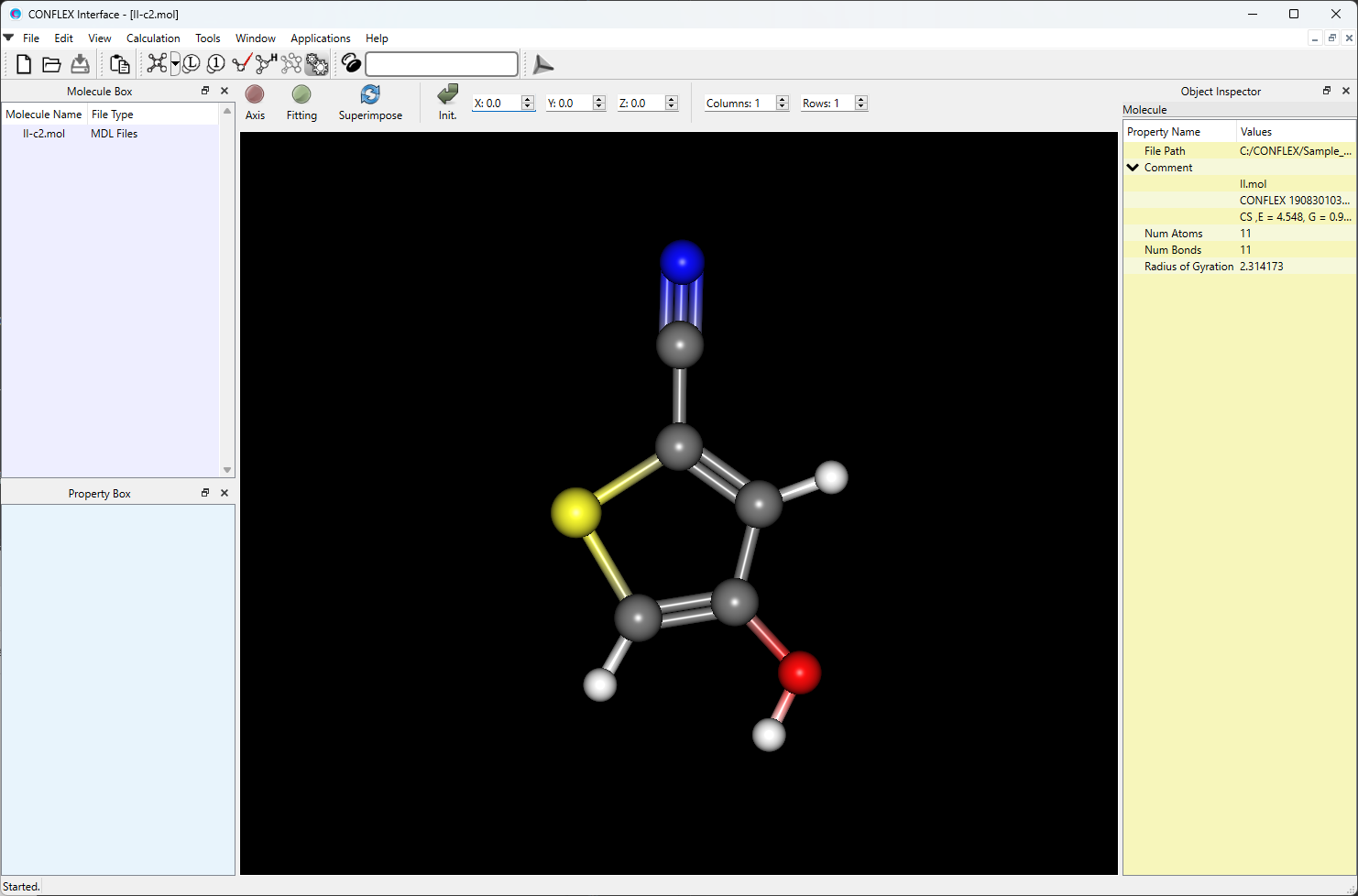
Select [CONFLEX] from the Calculation menu, and then click
in the calculation setting dialog that appears. A detailed settings dialog will be displayed.

To perform the crystal structure search, in [General Settings] dialog of the detailed settings dialog, select [Crystal Search] from the pull-down menu of [Calculation Type:].
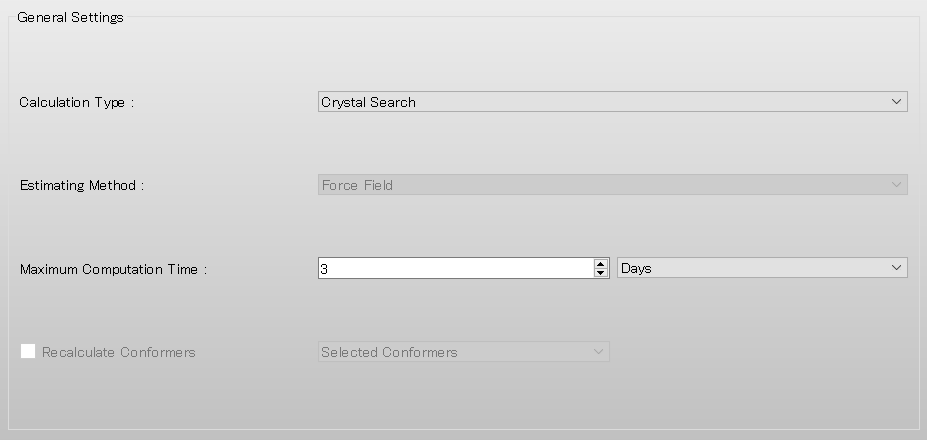
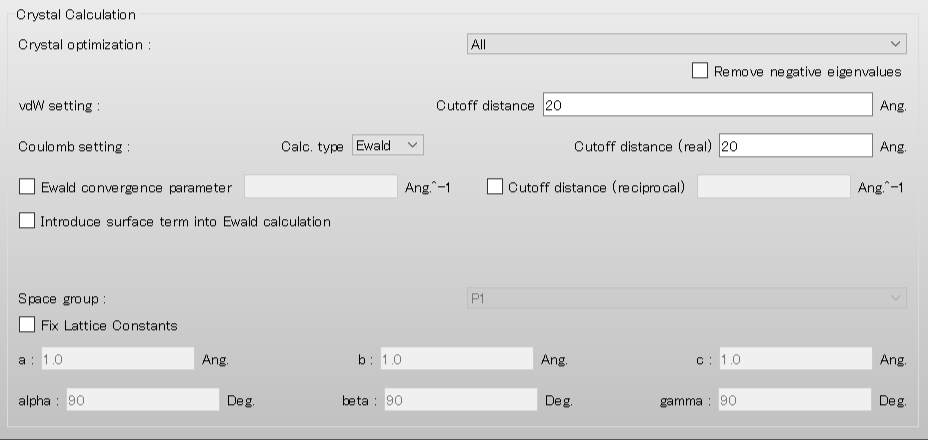
The default method for crystal structure optimization is [ALL]. You can change the optimization method by selecting a different option from the [Crystal Optimization:] pull-down menu in the [Crystal Calculation] dialog. In this dialog, you can also change settings for calculating intermolecular interactions such as the cutoff distance and the method for calculating Coulombic interactions, and other related parameters.
Next, we set the parameters for the crystal structure search in the [Crystal Search] dialog. First, to select the space groups using in the search, click of [Search Space Group:].
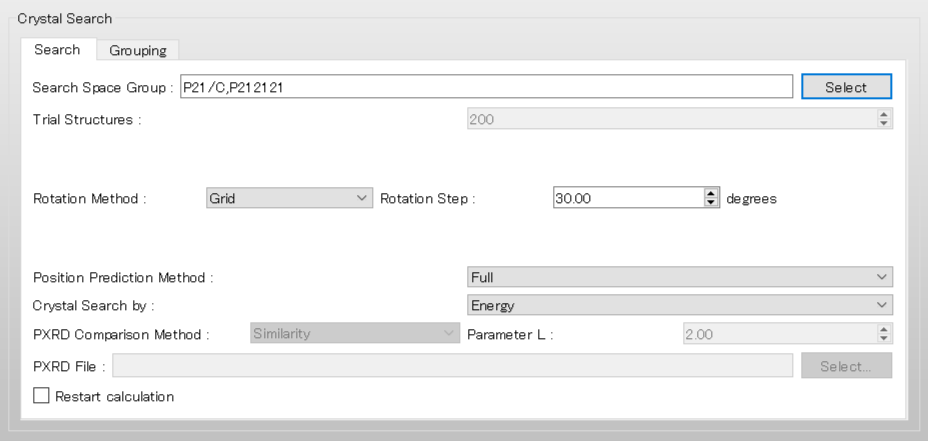
When you enter "top10" in the "Search..." field of the opened dialog, based on statistical analysis using the Cmbridge Structural Database, the top 10 most common space groups for organic crystals are displayed. Select all the space groups and click .
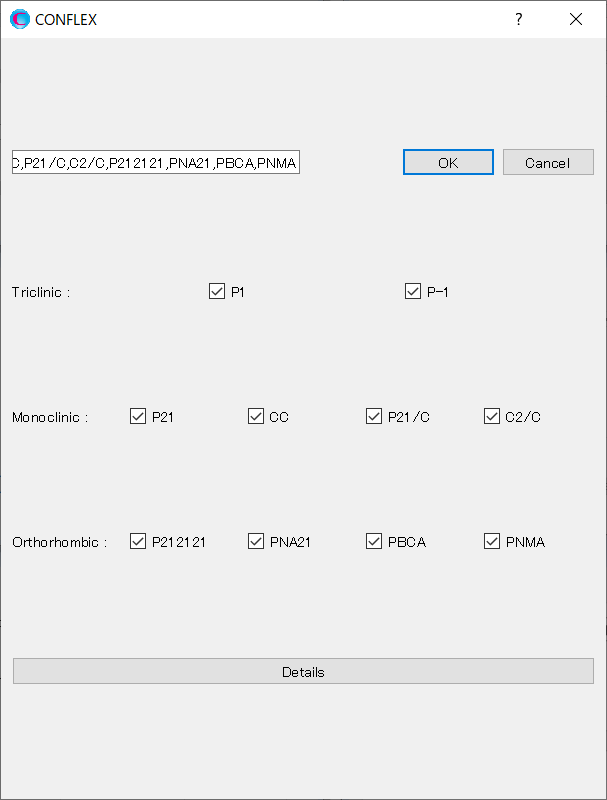
[Rotation Method:] and [Position Prediction Method:] set the methods for deteriming the initial molecular
orientation and position, respectively.
Here, both methods are set to [Random]. If you want to search in detail, each method should be set to [Grid]
and [Full], respectively.
[Trial Structures:] sets the number of trial structures that are created for the search. Here, the number of
trial structures is set to 10000.
If you use a larger number, you can perform a more accurate search, but the computational cost will be high.
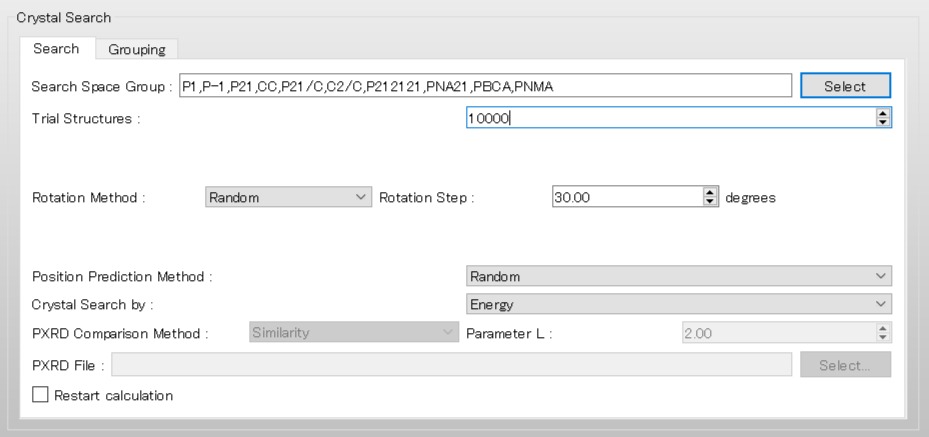
After completing the calculation settings, click to start the calculation.
[Running from the command line]
The calculation settings are defined by specifying keywords in the II-c2.ini file.
II-c2.ini file
CRYSTAL_SEARCH
CSP_SPGP=(P21/C,P-1,C2/C,P212121,P21,PBCA,PNA21,PNMA,CC,P1)
CSP_ROT_MODE=RANDOM
CSP_AUS_MODE=RANDOM
CSP_MAX_CRYSTAL=10000
CRYSTAL_OPTIMIZATION=ALL
[CRYSTAL_SEARCH] means to execute a crystal structure search.
The space groups used in the search are defined by the keyword [CSP_SPGP=]. Here, we use
P21/c, P-1, C2/c,
P212121, P21, Pbca, Pna21,
Pnma, Cc, and P1, which are the top 10 space groups based on the space group frequency ranking provided by the CCDC.
[CSP_ROT_MODE=] and [CSP_AUS_MODE=] set the methods for determining the initial molecular orientation and
position, respectively.
Here, both methods are set to [Random]. If you want to search in detail, each method should be set to [Grid]
and [Full], respectively.
[CSP_MAX_CRYSTAL=] sets the number of trial structures that are created for the search. Here, the number of
trial structures is set to 10000.
Using a larger number will give a more accurate search, but the computational cost will be high.
The method of crystal structure optimization is defined by the [CRYSTAL_OPTIMIZATION=] keyword and is set to
“ALL”.
The “ALL” optimization relaxes the molecular geometry, position, and orientation and cell
dimensions of the crystal.
Store the two files of II-c2.mol and II-c2.ini in a single folder, and execute the following command to start the calculation.
C:\CONFLEX\bin\conflex-10b.exe -par C:\CONFLEX\par -inp II-c2.molenter
The command above is for Windows OS. For other OS, please refer to [How to execute CONFLEX].
Calculation results
After the crystal structure search is complete, you will obtain the II-C2.csp file, which contains detailed
results of the search.
The [*** PREDICTED CRYSTAL STRUCTURES:] section of the II-C2.csp file lists the computationally suggested
polymorphs of II in order of crystal energy.
The structural data of these polymorphs are stored in the II-C2-PCS.cif file.
 *** PREDICTED CRYSTAL STRUCTURES:

    IDX    CID    E_RNK     CRYST      INTRA      INTER        VOL      DES        A         B         C       ALPHA     BETA      GAMMA     SPGP      NCALMOL   NCALATM    DMAX    NNEV
      4    318      1     -15.7921     4.6942   -20.4864      607.67   1.3663    9.5996    8.3419   10.7545   90.0000   44.8779   90.0000   P21/C          365      4015    20.00     0
     30   5295      2     -15.6634     4.7074   -20.3708      307.00   1.3522   13.4774    7.0951    4.3469   90.0000  132.3915   90.0000   P21            371      4081    20.00     0
    147   3622      3     -15.6125     4.7219   -20.3344      614.28   1.3515    4.3718   19.8181    7.0899   90.0000   90.0000   90.0000   P212121        373      4103    20.00     0
    167   3853      4     -15.6061     4.6925   -20.2986      612.84   1.3547    9.6310    8.3434    7.6267   90.0000   90.0000   90.0000   P212121        325      3575    20.00     0
    178     51      5     -15.5986     4.7162   -20.3147      614.93   1.3501    4.3234    7.1069   21.9413   90.0000  114.1992   90.0000   P21/C          371      4081    20.00     0
    190     90      6     -15.4618     4.7170   -20.1789      618.80   1.3417    4.3746    7.0720   24.0800   90.0000  123.8359   90.0000   P21/C          374      4114    20.00     0
    195   1948      7     -15.3029     4.7145   -20.0173     1222.44   1.3583   14.5999    8.3633   10.4384   90.0000   73.5604   90.0000   C2/C           357      3927    20.00     0
    206    169      8     -15.2948     4.7210   -20.0158      612.95   1.3545    4.0230    8.3785   19.4984   90.0000  111.1490   90.0000   P21/C          358      3938    20.00     0
    229     18      9     -15.2940     4.7263   -20.0203      612.53   1.3554    8.3759   18.2972    8.8552   90.0000   26.8303   90.0000   P21/C          365      4015    20.00     0
    290      4     10     -15.2939     4.7218   -20.0156      612.74   1.3549    8.3793   18.2092    9.2919   90.0000   25.6065   90.0000   P21/C          357      3927    20.00     0
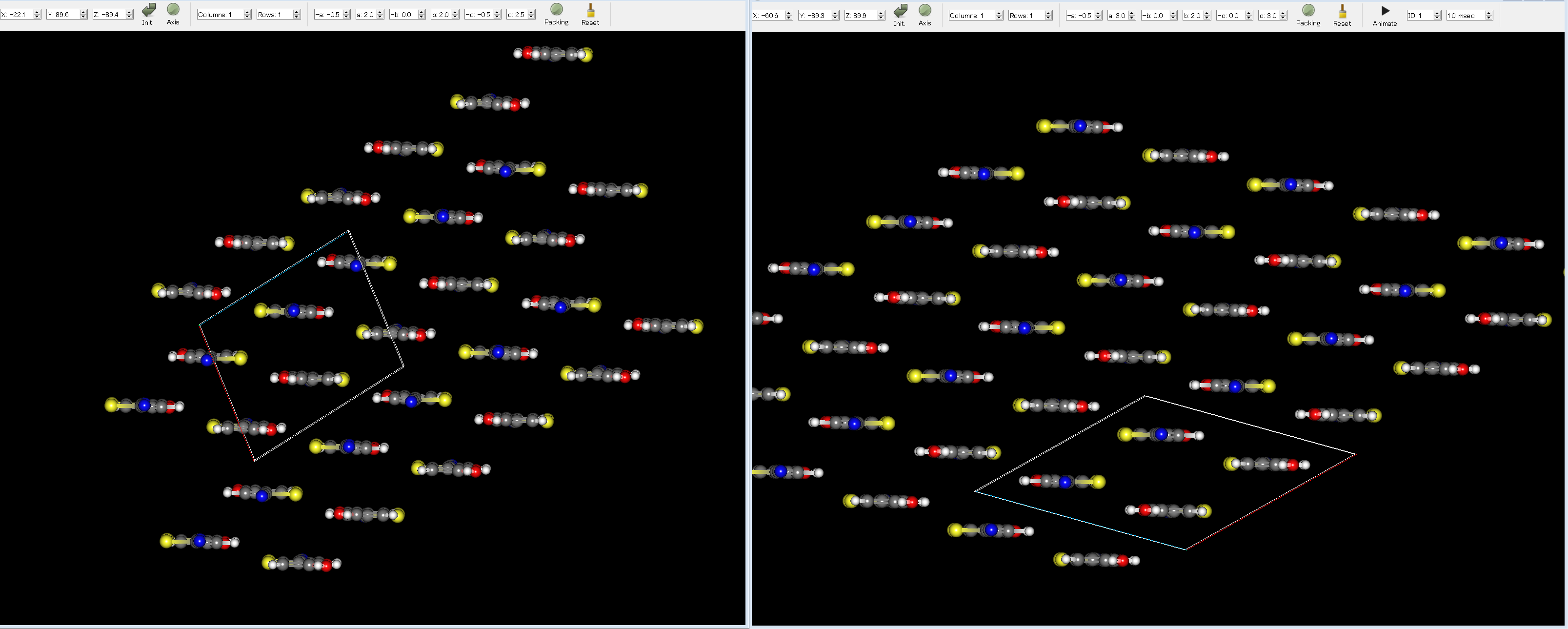
Here, by comparing the experimental structure (left figure) with the first structure (right figure), you can see that the two structures match well.
[Crystal structure search for a multi-component system]
This section describes a crystal structure search for an asymmetric unit containing multiple components.
Here, we use a co-crystal of 2-amino-4-methylpyrimidine and 2-methylbenzoic acid, which was employed in the
CSP blind test.
First, molecular structures of 2-amino-4-methylpyrimidine and 2-methylbenzoic acid are created using
PerkinElmer ChemDraw software.
Please refer to the ChemDraw manual for instructions on how to use the software.
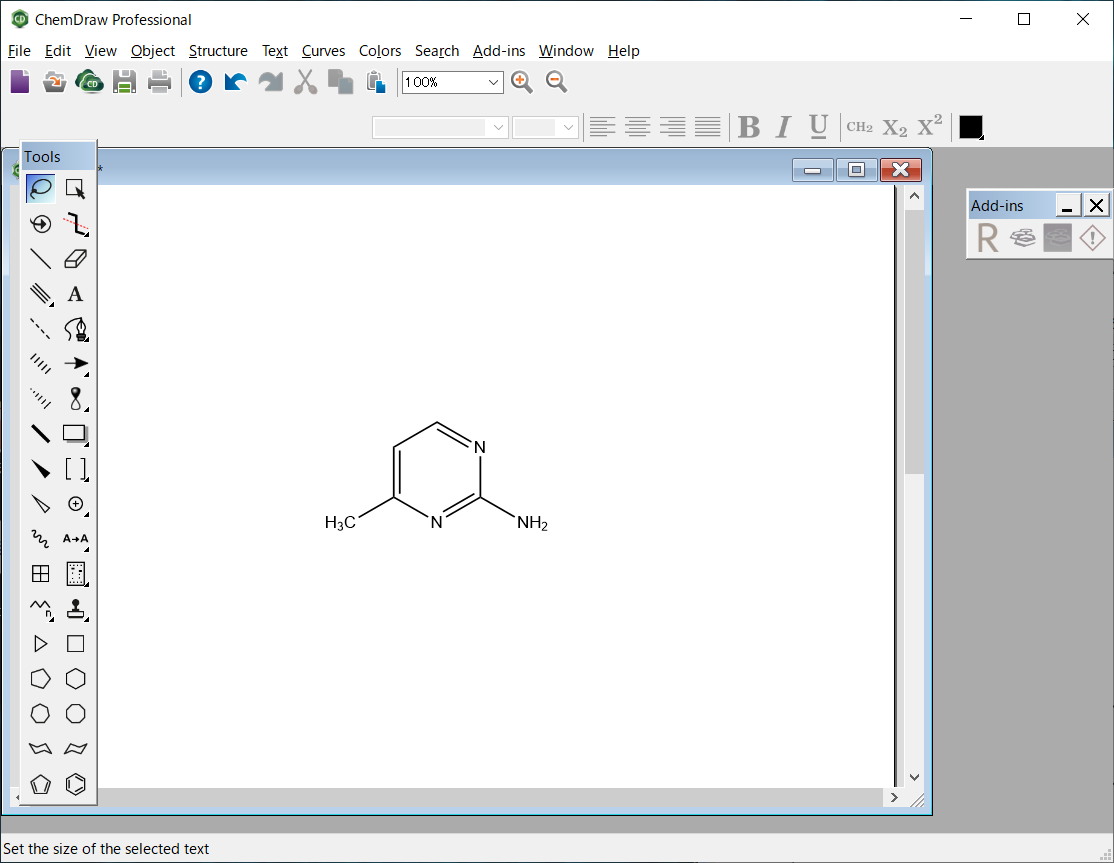
The molecular file of 2-amino-4-methylpyrimidine is saved as “AMP.mol” in the MDL MOL file format.
The molecular file of 2-amino-4-methylpyrimidine is saved in MDL MOL format as “AMP.mol”.
AMP.mol file
AMP.mol
ChemDraw09022015212D

  8  8  0  0  0  0  0  0  0  0999 V2000
   -0.7145    0.4125    0.0000 C   0  0  0  0  0  0  0  0  0  0  0  0
   -0.7145   -0.4125    0.0000 C   0  0  0  0  0  0  0  0  0  0  0  0
   -0.0000   -0.8250    0.0000 N   0  0  0  0  0  0  0  0  0  0  0  0
    0.7145   -0.4125    0.0000 C   0  0  0  0  0  0  0  0  0  0  0  0
    0.7145    0.4125    0.0000 N   0  0  0  0  0  0  0  0  0  0  0  0
   -0.0000    0.8250    0.0000 C   0  0  0  0  0  0  0  0  0  0  0  0
   -1.4289   -0.8250    0.0000 C   0  0  0  0  0  0  0  0  0  0  0  0
    1.4289   -0.8250    0.0000 N   0  0  0  0  0  0  0  0  0  0  0  0
  1  2  2  0
  2  3  1  0
  3  4  2  0
  4  5  1  0
  5  6  2  0
  6  1  1  0
  2  7  1  0
  4  8  1  0
M  END
The molecular file of 2-methylbenzoic acid is saved as “MBA.mol” in the MDL MOL file format.
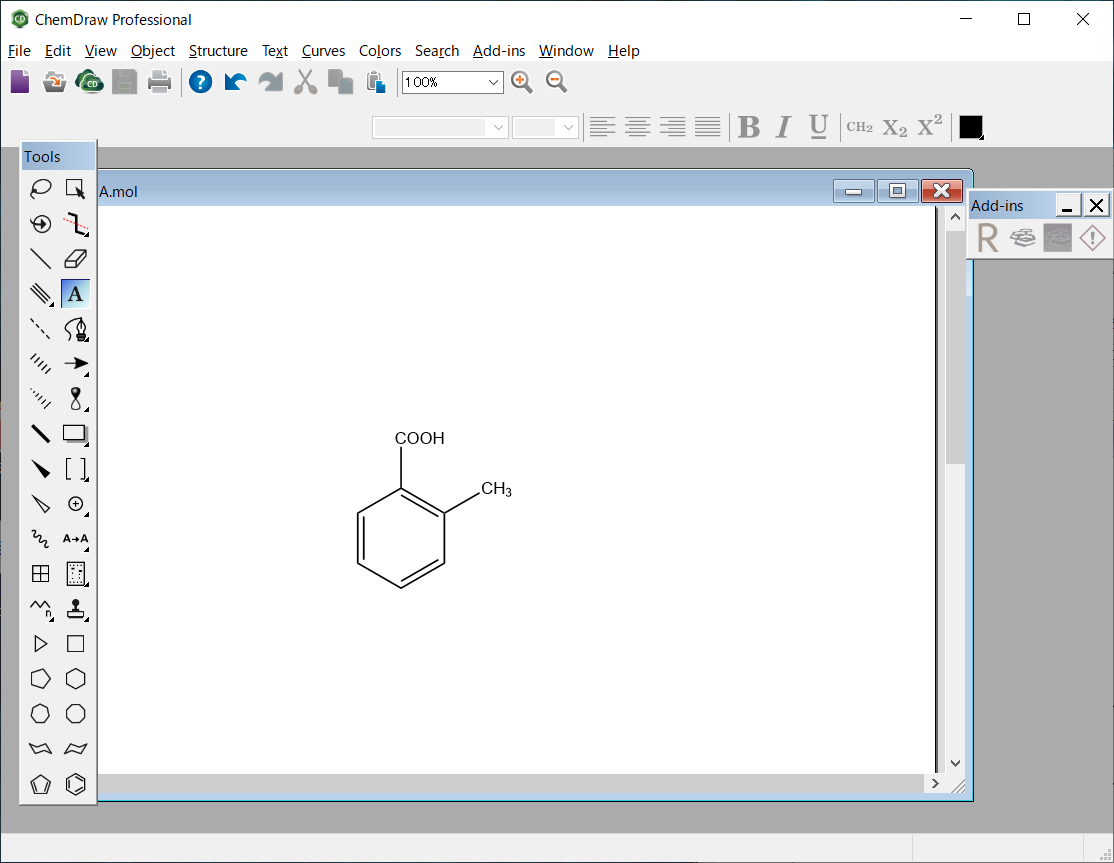
MBA.mol file
MBA.mol
ChemDraw09022015232D

 10 10  0  0  0  0  0  0  0  0999 V2000
   -1.0717   -0.2062    0.0000 C   0  0  0  0  0  0  0  0  0  0  0  0
   -1.0717   -1.0313    0.0000 C   0  0  0  0  0  0  0  0  0  0  0  0
   -0.3572   -1.4438    0.0000 C   0  0  0  0  0  0  0  0  0  0  0  0
    0.3572   -1.0313    0.0000 C   0  0  0  0  0  0  0  0  0  0  0  0
    0.3572   -0.2062    0.0000 C   0  0  0  0  0  0  0  0  0  0  0  0
   -0.3572    0.2062    0.0000 C   0  0  0  0  0  0  0  0  0  0  0  0
    1.0717    0.2062    0.0000 C   0  0  0  0  0  0  0  0  0  0  0  0
   -0.3572    1.0313    0.0000 C   0  0  0  0  0  0  0  0  0  0  0  0
   -1.0717    1.4438    0.0000 O   0  0  0  0  0  0  0  0  0  0  0  0
    0.3572    1.4438    0.0000 O   0  0  0  0  0  0  0  0  0  0  0  0
  8  9  2  0
  8 10  1  0
  6  8  1  0
  1  2  2  0
  2  3  1  0
  3  4  2  0
  4  5  1  0
  5  6  2  0
  6  1  1  0
  5  7  1  0
M  STY  1   1 SUP
M  SLB  1   1   1
M  SAL   1  3   8   9  10
M  SBL   1  1   3
M  SMT   1 COOH
M  SBV   1   3    0.0000   -0.8250
M  END
Next, geometry optimizations of 2-amino-4-methylpyrimidine and 2-methylbenzoic acid are performed.
[Running from the Interface]
Open the AMP.mol file using CONFLEX Interface.
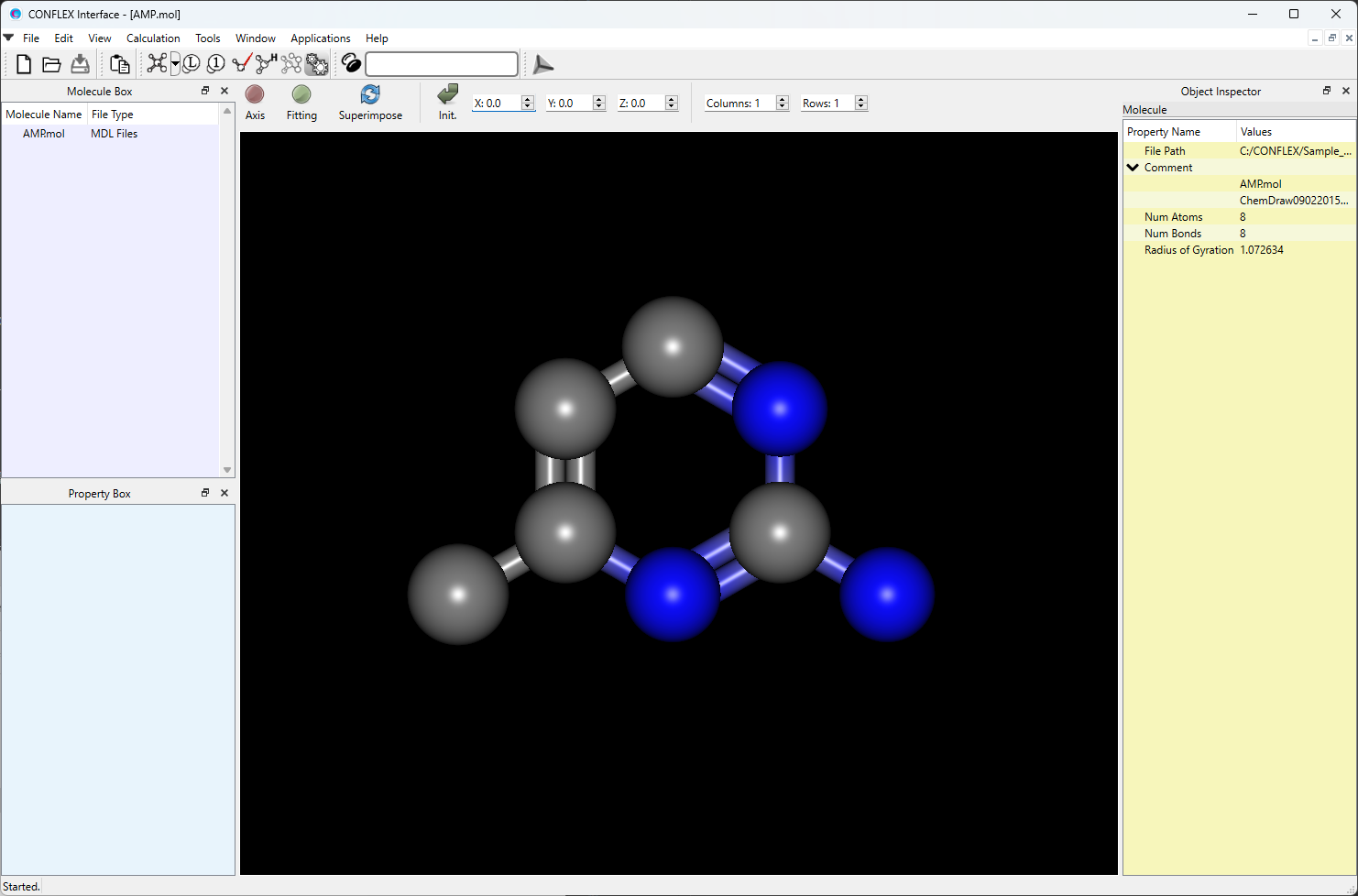
Select [CONFLEX] from the Calculation menu, and then click in the calculation setting dialog that appears. The geometry optimization of 2-amino-4-methylpyrimidine will be started.

Next, open the MBA.mol file using CONFLEX Interface.
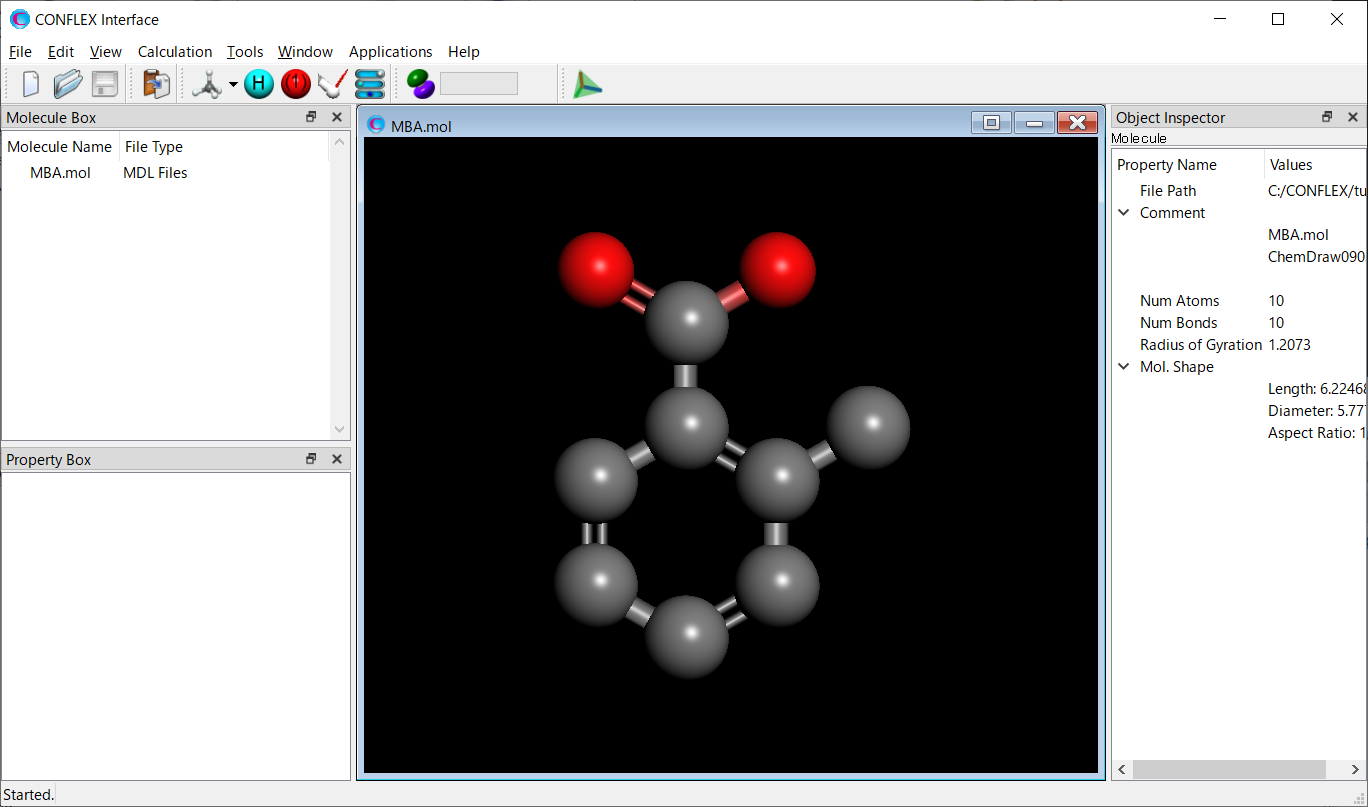
Select [CONFLEX] from the Calculation menu, and then click in the calculation setting dialog that appears. The geometry optimization of 2-methylbenzoic acid will be started.

[Running from the command line]
Store the AMP.mol and MBA.mol in a folder, and execute the following commands. The geometry optimizations will
be started.
When ini files are not prepared, CONFLEX carries out the optimizations of input structures with the default
settings.
C:\CONFLEX\bin\conflex-10b.exe -par C:\CONFLEX\par -inp AMP.molenterC:\CONFLEX\bin\conflex-10b.exe -par C:\CONFLEX\par -inp MBA.molenter
The command above is for Windows OS. For other OS, please refer to [How to execute CONFLEX].
The 2-methylbenzoic acid molecule has several conformations. Therefore, a conformation search should be performed.
[Running from the Interface]
Open the MBA-F.mol file using CONFLEX Interface.
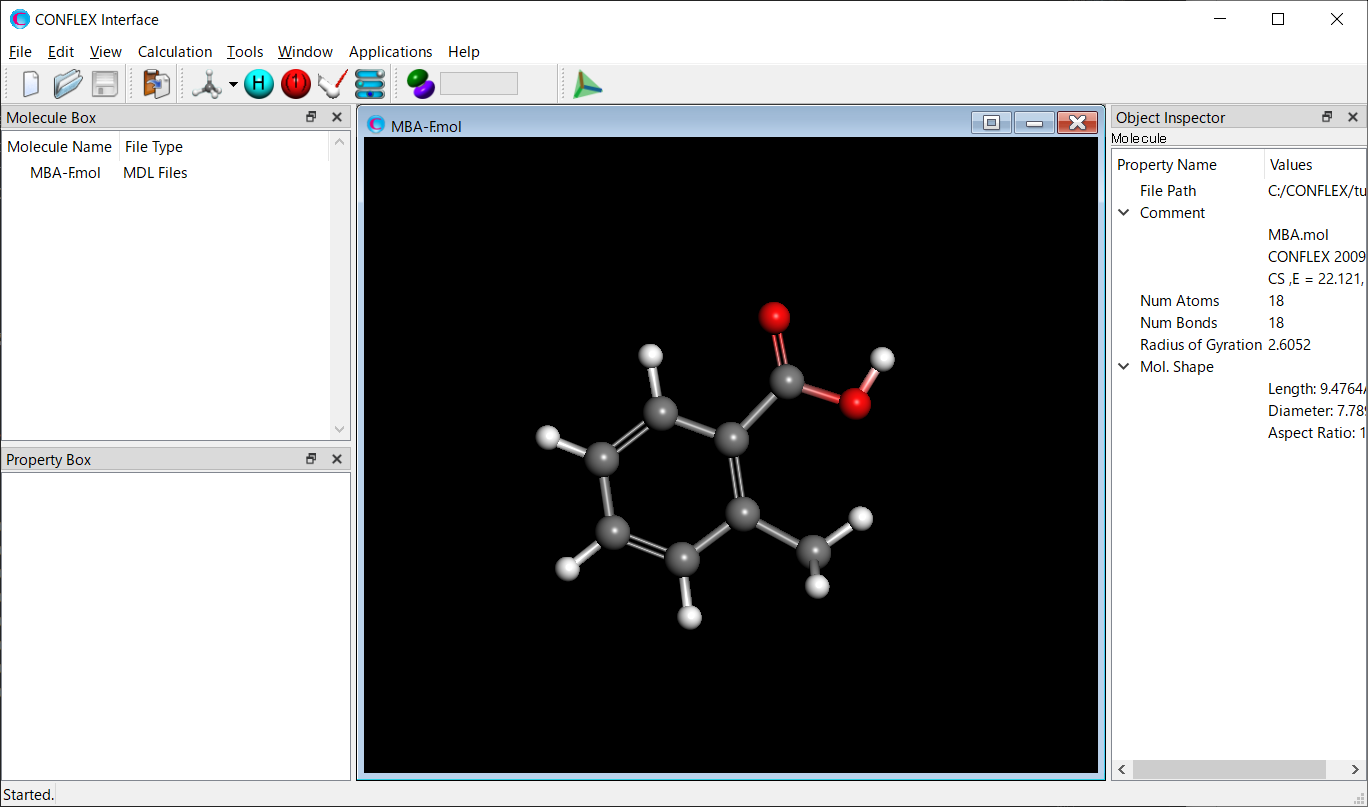
Select [CONFLEX] from the Calculation menu, and select [Conformation Search] from the [Calculation Type:]
pull-down menu on the calculation setting dialog that appears.
Edit the value of [Search Limit:] to 10.0. This parameter is used as a criterion for selecting the initial
structures in the conformation search.
After completing the calculation settings, click to start the
calculation.

[Running from the command line]
The calculation settings are defined by specifying keywords in the MBA-F.ini file.
MBA-F.ini file
CONFLEX SEL=10.0
[CONFLEX] means that the conformation search is performed.
[SEL=10.0] means that the search limit, which is used as a criterion for selecting the initial structure in
the conformation search, is set to 10.0 kcal/mol.
Store the two files of MBA-F.mol and MBA-F.ini in a single folder, and execute the following command to start the calculation.
C:\CONFLEX\bin\conflex-10b.exe -par C:\CONFLEX\par -inp MBA-F.molenter
The command above is for Windows OS. For other OS, please refer to [How to execute CONFLEX].
After the conformational search, seven conformers of 2-methylbenzoic acid are obtained.
Here, we use the most stable conformer for the next calculation. The structural data of the selected conformer
is extracted from “MBA-F.sdf” file and saved as “MBA-c1.mol”.
The “MBA-F.sdf” file is located in the same folder as the “MBA-F.mol” file.
MBA-c1.mol file
MBA.mol
CONFLEX 20090215293D 1   1.00000    16.90241     3
CS  ,E =      16.902, G = 0.213E-06, P =  89.7913, M( 0), IFN =00000001-00000003
 18 18  0     0               999 V2000
   -1.3006    0.8083    0.0000 C   0  0  0  0  0
   -2.4209   -0.0240    0.0000 C   0  0  0  0  0
   -2.2574   -1.4041    0.0000 C   0  0  0  0  0
   -0.9754   -1.9534   -0.0000 C   0  0  0  0  0
    0.1671   -1.1315   -0.0000 C   0  0  0  0  0
   -0.0000    0.2708    0.0000 C   0  0  0  0  0
    1.5196   -1.7909   -0.0000 C   0  0  0  0  0
    1.1760    1.1942    0.0000 C   0  0  0  0  0
    2.3544    0.8930    0.0000 O   0  0  0  0  0
    0.8165    2.4930   -0.0000 O   0  0  0  0  0
   -1.4568    1.8849    0.0000 H   0  0  0  0  0
   -3.4187    0.4075    0.0000 H   0  0  0  0  0
   -3.1277   -2.0558    0.0000 H   0  0  0  0  0
   -0.8717   -3.0372   -0.0000 H   0  0  0  0  0
    2.0811   -1.5139    0.8977 H   0  0  0  0  0
    1.4333   -2.8831   -0.0000 H   0  0  0  0  0
    2.0811   -1.5139   -0.8977 H   0  0  0  0  0
    1.6744    2.9669   -0.0000 H   0  0  0  0  0
  8  9  2  0     0
  8 10  1  0     0
  6  8  1  0     0
  1  2  2  0     0
  2  3  1  0     0
  3  4  2  0     0
  4  5  1  0     0
  5  6  2  0     0
  6  1  1  0     0
  5  7  1  0     0
  1 11  1  0     0
  2 12  1  0     0
  3 13  1  0     0
  4 14  1  0     0
  7 15  1  0     0
  7 16  1  0     0
  7 17  1  0     0
 10 18  1  0     0
M  END
Next, to determine the initial arrangement of the 2-amino-4-methylpyrimidine and 2-methylbenzoic acid molecules, perform a host-ligand coordination search.
[Running from the Interface]
Open the AMP-F.mol file using the CONFLEX Interface.
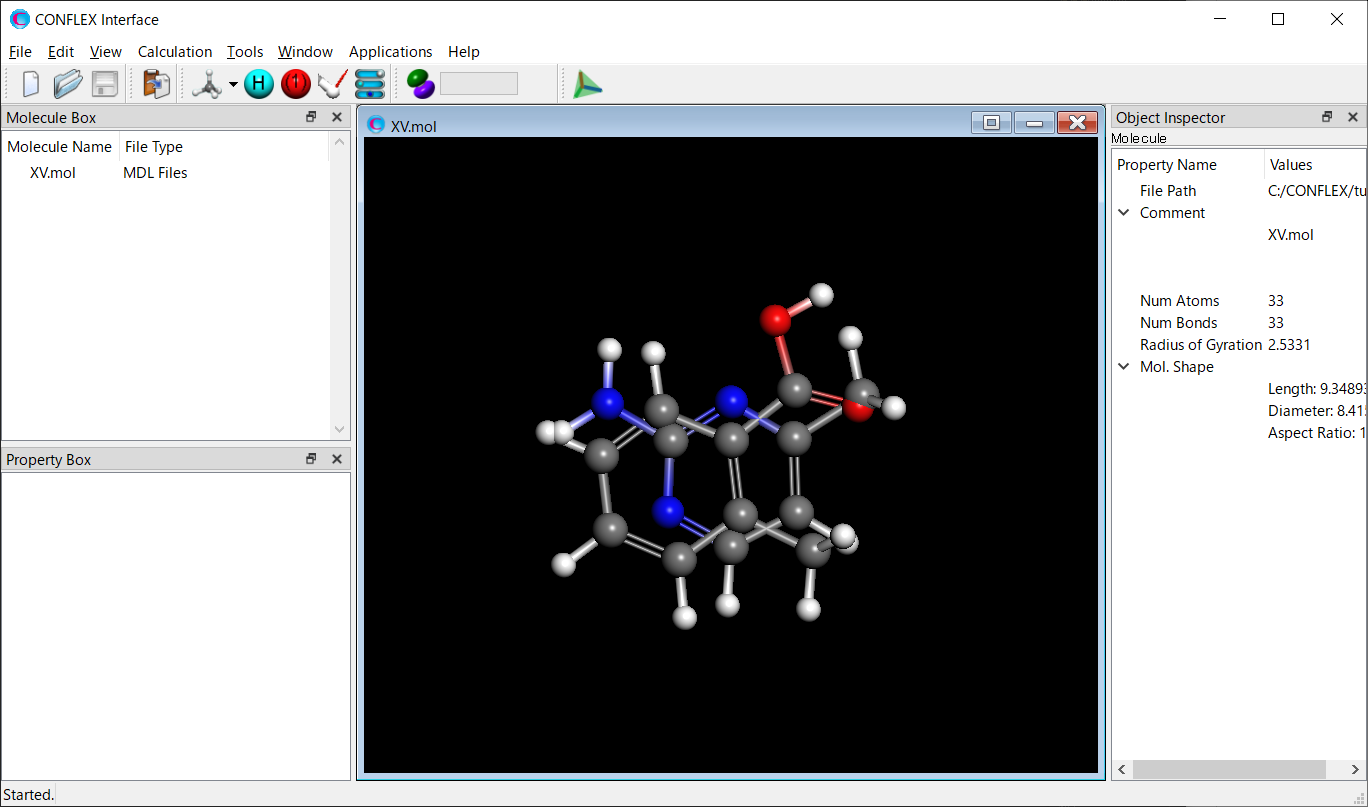
From the Calculation menu, select "CONFLEX," then click in the calculation settings dialog that opens. The detailed settings dialog opens.

To run the host-ligand coordination search, select "Host Ligand Search" from the "Calculation Type:" pull-down menu in the "General Settings" dialog of the detailed settings dialog.
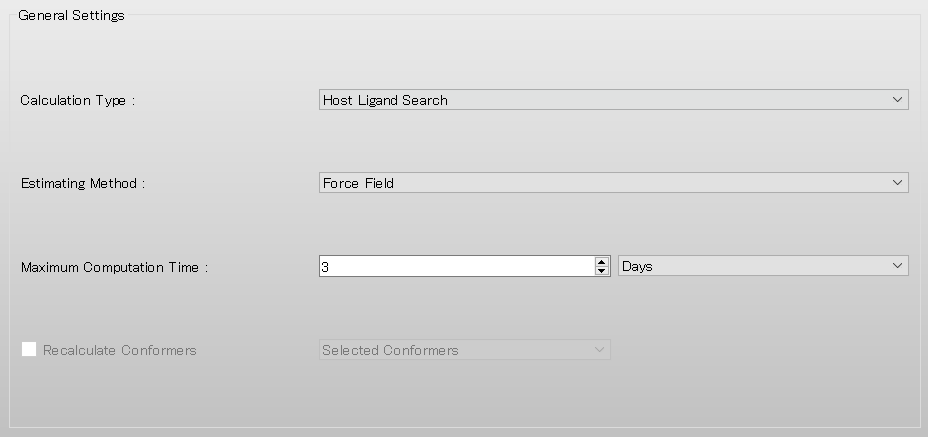
To add a 2-methylbenzoic acid molecule to the 2-amino-4-methylpyrimidine molecule, click under "Insert Guest Molecules" and select the MBA-c1.mol file.

Configure the host-ligand coordination search in the "Host Ligand Search" dialog.
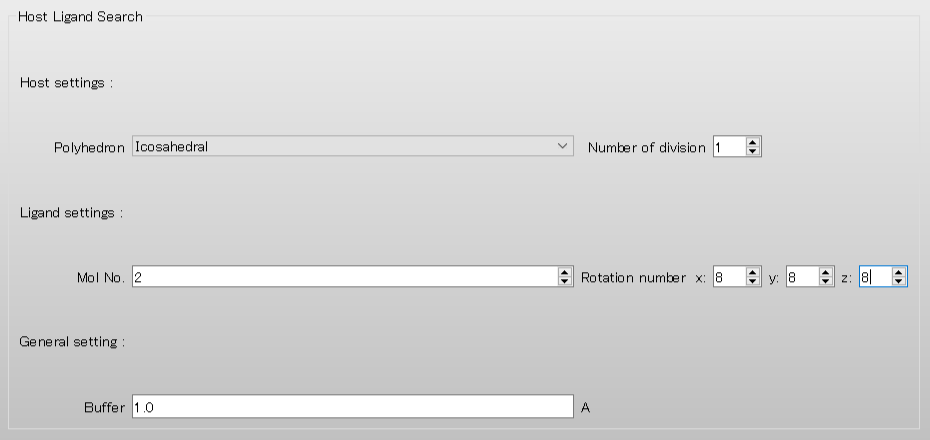
Here, to rotate the 2-methylbenzoic acid molecule (set as the ligand) in 45-degree increments, set each of the "Rotational number x, y, z" values to "8." When you have finished, click . The calculation begins.
[Running from the command line]
Configure the calculation by writing keywords in the AMP-F.ini file.
AMP-F.ini file
HLSEARCH
HLSEARCH_LIGAND_ROT=(8,8,8)
To perform a host-ligand coordination search in CONFLEX, write the "HLSEARCH" keyword.
In addition, to rotate the 2-methylbenzoic acid molecule (set as the ligand) in 45-degree increments, write
the "HLSEARCH_LIGAND_ROT=(8,8,8)" keyword.
To add a 2-methylbenzoic acid molecule to the 2-amino-4-methylpyrimidine molecule, specify
MBA-c1.mol with the -guest option.
Place the three files—AMP-F.mol, AMP-F.ini, and MBA-c1.mol—in a single folder, and run the command below. The calculation begins.
C:\CONFLEX\bin\conflex-10b.exe -par C:\CONFLEX\par -host AMP-F.mol -guest MBA-c1.molenter
The above is for Windows. For the run commands on other operating systems, see "How to Run" in this manual.
The host-ligand coordination search yields 47 structures. Here, we use the lowest-energy structure for the crystal structure search. To do so, from the “AMP-F_MBA-c1.sdf” file, create the lowest-energy structure as “XV-c1.mol”. The AMP-F_MBA-c1.sdf file is stored in the same folder as AMP-F.mol and the other files.
XV-c1.mol file
XV.mol
CONFLEX 20090215503D 1   1.00000   -86.91814    17
NONE,E =     -86.918, G = 0.249E-06, P =  20.9930, M( 0), IFN =00000001-00000017
 33 33  0     0               999 V2000
   -4.6389    1.0672    0.0877 C   0  0  0  0  0
   -3.2840    1.2059    0.3058 C   0  0  0  0  0
   -2.4142    0.1779    0.1589 N   0  0  0  0  0
   -2.9370   -1.0122   -0.1834 C   0  0  0  0  0
   -4.2342   -1.2388   -0.4067 N   0  0  0  0  0
   -5.0617   -0.1892   -0.2687 C   0  0  0  0  0
   -2.7235    2.5426    0.6933 C   0  0  0  0  0
   -2.0889   -2.0671   -0.3182 N   0  0  0  0  0
   -5.3328    1.8902    0.1921 H   0  0  0  0  0
   -6.1102   -0.3980   -0.4587 H   0  0  0  0  0
   -1.6892    2.4500    1.0374 H   0  0  0  0  0
   -2.7441    3.2203   -0.1656 H   0  0  0  0  0
   -3.3069    2.9800    1.5099 H   0  0  0  0  0
   -2.4812   -2.9552   -0.5738 H   0  0  0  0  0
   -1.0952   -1.9477   -0.1563 H   0  0  0  0  0
    2.8428    1.4208   -0.4637 C   0  0  0  0  0
    4.1800    1.8122   -0.5390 C   0  0  0  0  0
    5.1849    0.9050   -0.2233 C   0  0  0  0  0
    4.8550   -0.3923    0.1698 C   0  0  0  0  0
    3.5126   -0.8046    0.2572 C   0  0  0  0  0
    2.4937    0.1165   -0.0682 C   0  0  0  0  0
    3.2239   -2.2160    0.6905 C   0  0  0  0  0
    1.0518   -0.2696   -0.0173 C   0  0  0  0  0
    0.6010   -1.3998    0.0329 O   0  0  0  0  0
    0.2426    0.8063   -0.0191 O   0  0  0  0  0
    2.0730    2.1442   -0.7236 H   0  0  0  0  0
    4.4339    2.8231   -0.8471 H   0  0  0  0  0
    6.2281    1.2054   -0.2833 H   0  0  0  0  0
    5.6587   -1.0857    0.4113 H   0  0  0  0  0
    2.7876   -2.7870   -0.1349 H   0  0  0  0  0
    4.1382   -2.7349    0.9990 H   0  0  0  0  0
    2.5491   -2.2242    1.5524 H   0  0  0  0  0
   -0.6842    0.4546    0.0376 H   0  0  0  0  0
  1  2  2  0     0
  2  3  1  0     0
  3  4  2  0     0
  4  5  1  0     0
  5  6  2  0     0
  6  1  1  0     0
  2  7  1  0     0
  4  8  1  0     0
  1  9  1  0     0
  6 10  1  0     0
  7 11  1  0     0
  7 12  1  0     0
  7 13  1  0     0
  8 14  1  0     0
  8 15  1  0     0
 23 24  2  0     0
 23 25  1  0     0
 21 23  1  0     0
 16 17  2  0     0
 17 18  1  0     0
 18 19  2  0     0
 19 20  1  0     0
 20 21  2  0     0
 21 16  1  0     0
 20 22  1  0     0
 16 26  1  0     0
 17 27  1  0     0
 18 28  1  0     0
 19 29  1  0     0
 22 30  1  0     0
 22 31  1  0     0
 22 32  1  0     0
 25 33  1  0     0
M  END
Finally, we carry out the crystal structure search.
[Running from the Interface]
Open the XV-c1.mol file using CONFLEX Interface.
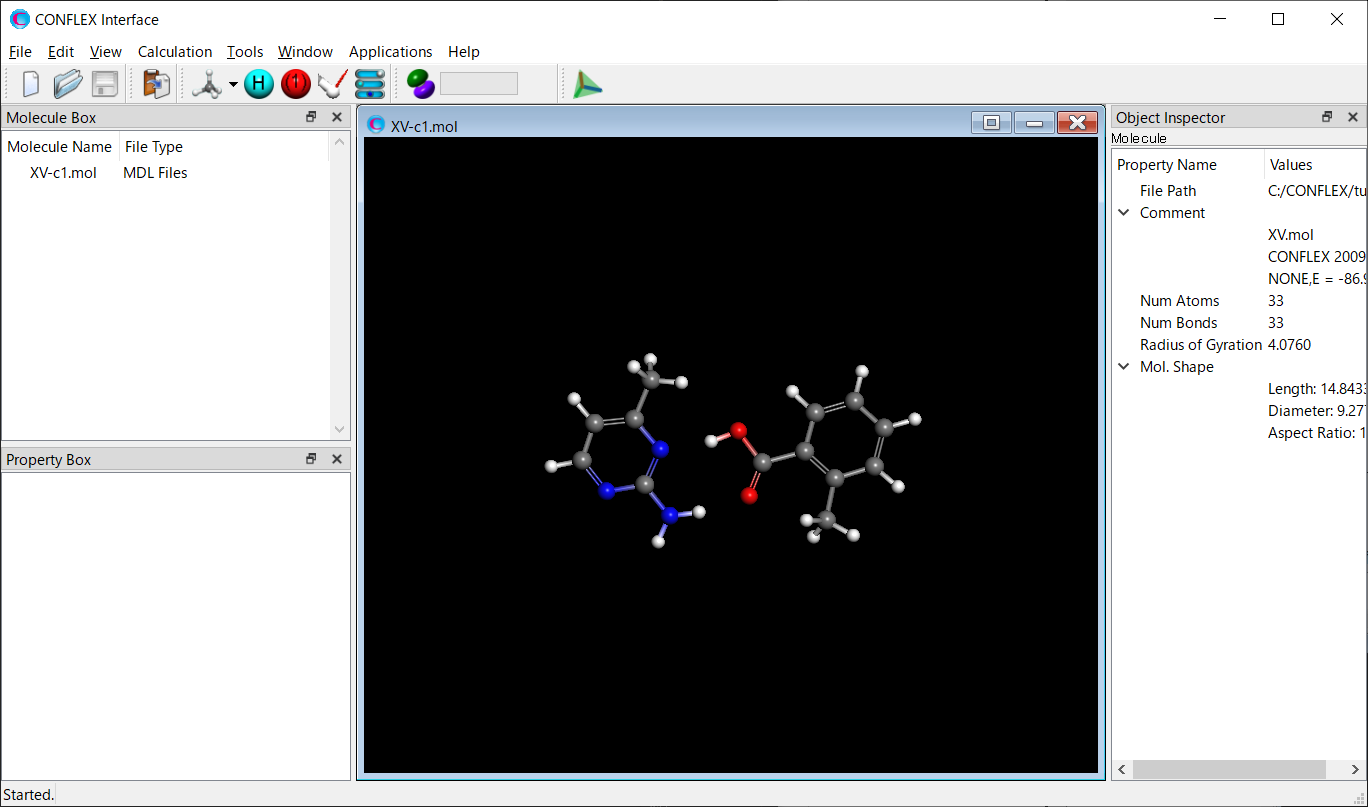
Select [CONFLEX] from the Calculation menu, and then click
in the calculation setting dialog that appears. A detailed settings dialog will be displayed.

To perform the crystal structure search, in [General Settings] dialog of the detailed settings dialog, select [Crystal Search] from the pull-down menu of [Calculation Type:].
The method of crystal structure optimization is [ALL] by default. You can change the type of crystal structure
optimization by the pull-down menu of [Crystal optimization:] in [Crystal Calculation] dialog.
In this dialog, you can also change settings for calculating intermolecular interactions such as the cutoff
distance and the method for calculating Coulombic interactions, and other related parameters.
Next, we configure the settings for the crystal structure search using the [Crystal Search] dialog.
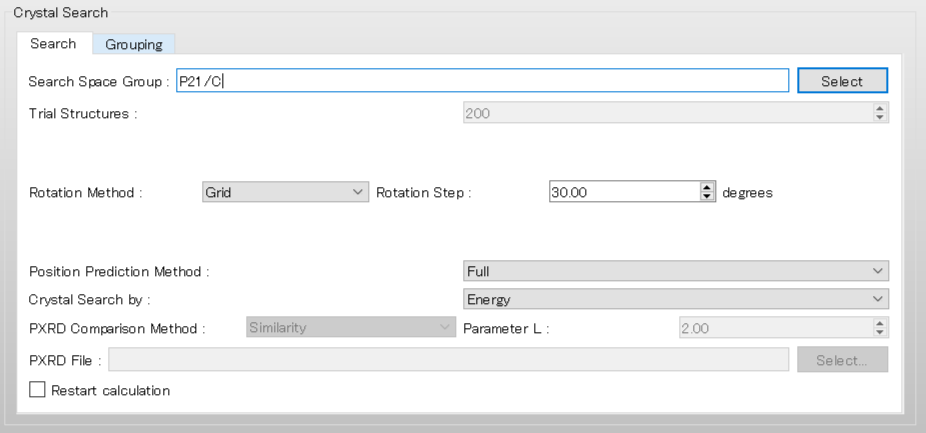
To use the space group of P21/c, edit the [Search Space Group:] from
“P21/C,P212121” to “P21/C”. Also set the [Rotation Step:] value to 20.00 to rotate the
molecular complex in 20-degree increments.
After completing the calculation settings, click to start the
calculation.
[Running from the command line]
The calculation settings are defined by specifying keywords in the XV-c1.ini file.
XV-c1.ini file
CRYSTAL_SEARCH
CSP_SPGP=(P21/C)
CSP_RSTEP=20.0
[CRYSTAL_SEARCH] means to execute the crystal structure search.
The space groups used in the crystal structure search are defined by “CSP_SPGP=” keyword. Here,
“CSP_SPGP=(P21/C)” is set, meaning that the P21/c is applied to the
search.
Store the two files of XV-c1.mol and XV-c1.ini in a single folder, and execute the following command to start the calculation.
C:\CONFLEX\bin\conflex-10b.exe -par C:\CONFLEX\par -inp XV-c1.molenter
The command above is for Windows OS. For other OS, please refer to [How to execute CONFLEX].
Calculation results
After the calculation, the XV-c1.csp file is generated, which contains detailed results of the search.
The [*** PREDICTED CRYSTAL STRUCTURES:] section of the XV-c1.csp file lists the computationally suggested
polymorphs of 2-amino-4-methylpyrimidine and 2-methylbenzoic acid co-crystal in order of crystal energy.
the structure data of the polymorphs are stored in the XV-c1-PCS.cif file.
 *** PREDICTED CRYSTAL STRUCTURES:

    IDX    CID    E_RNK     CRYST      INTRA      INTER        VOL      DES        A         B         C       ALPHA     BETA      GAMMA     SPGP      NCALMOL   NCALATM    DMAX    NNEV
     43     19      1    -112.2561   -73.1657   -39.0905     1384.68   1.1758    6.3597   14.7215   17.2181   90.0000  120.8001   90.0000   P21/C          426      7035    20.00     0
     54    487      2    -112.1447   -72.8870   -39.2577     1330.39   1.2238    7.4330   26.1512    7.7427   90.0000   62.1242   90.0000   P21/C          436      7188    20.00     0
     55   6106      3    -112.1190   -73.0217   -39.0973     1373.52   1.1854    7.2525   14.8932   15.7678   90.0000   53.7521   90.0000   P21/C          421      6951    20.00     0
     61   1692      4    -112.0257   -72.0386   -39.9871     1368.67   1.1895    8.9646    9.9375   27.1501   90.0000  145.5370   90.0000   P21/C          431      7128    20.00     0
     66   3542      5    -111.8336   -73.1270   -38.7065     1409.79   1.1549   13.5655   12.0776   27.5867   90.0000   18.1748   90.0000   P21/C          421      6948    20.00     0
     73   1208      6    -111.7751   -73.3963   -38.3788     1415.10   1.1505   13.0894   10.0679   11.9525   90.0000   63.9490   90.0000   P21/C          430      7092    20.00     0
    119     33      7    -111.7587   -73.2931   -38.4656     1403.79   1.1598   26.0879   11.1575    8.6903   90.0000  146.2923   90.0000   P21/C          420      6936    20.00     0
    135   4315      8    -111.7046   -72.2275   -39.4771     1399.29   1.1635    7.1345   12.0828   25.4413   90.0000   39.6451   90.0000   P21/C          426      7035    20.00     0
    139   1769      9    -111.5333   -72.9261   -38.6073     1414.94   1.1507   12.3562    8.0869   14.2635   90.0000   96.8972   90.0000   P21/C          412      6807    20.00     0
    142    967     10    -111.5221   -72.4012   -39.1210     1351.36   1.2048    9.9354   10.2689   13.7854   90.0000  106.0926   90.0000   P21/C          432      7152    20.00     0
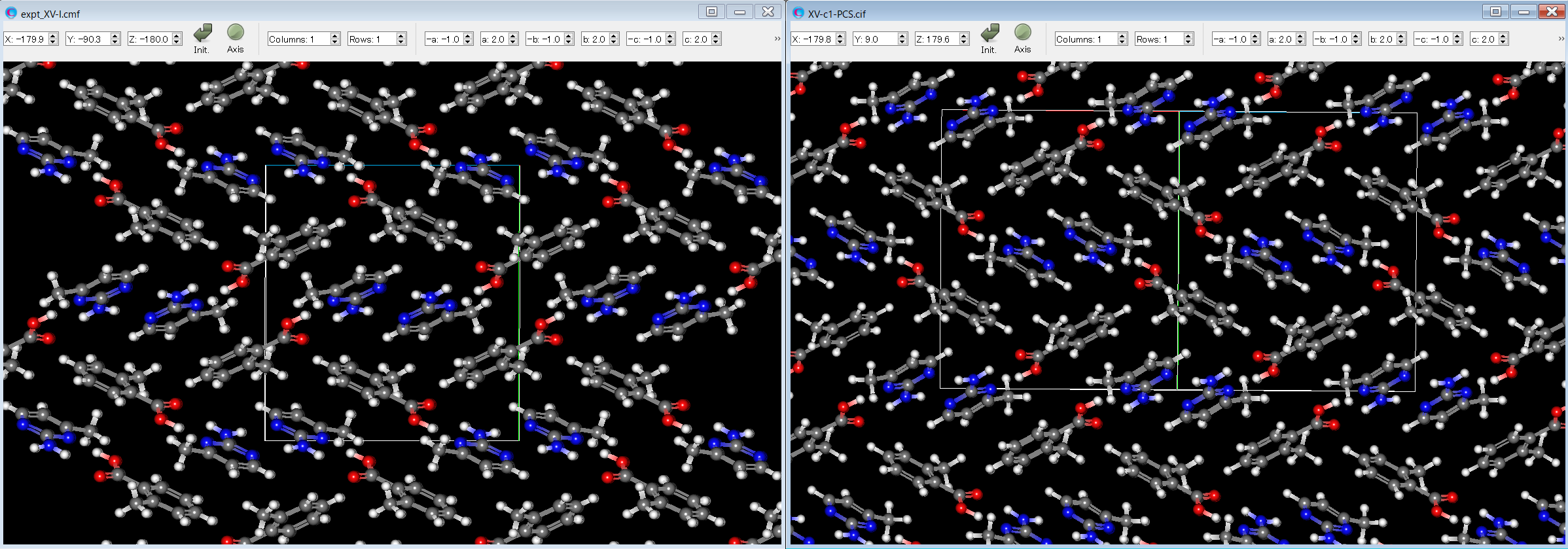
Here, by comparing the experimental structure (left figure) with the third structure (right figure), it can be seen that both structures match well.
[Crystal structure search using PXRD data]
We explain how to apply CONFLEX to crystal structure determination from powder X-ray diffraction (PXRD) data. In this example, we use the crystal structure of pamoic acid reported by Haynes et al. [D. A. Haynes et al., Acta Cryst. 2006, E62, o1170.]. First, a molecular file for pamoic acid is created using PerkinElmer ChemDraw software. Please refer to the ChemDraw manual for instructions on how to use the software. The molecular file of pamoic acid is saved as “pamoic-acid.mol” in MDL MOL file format.
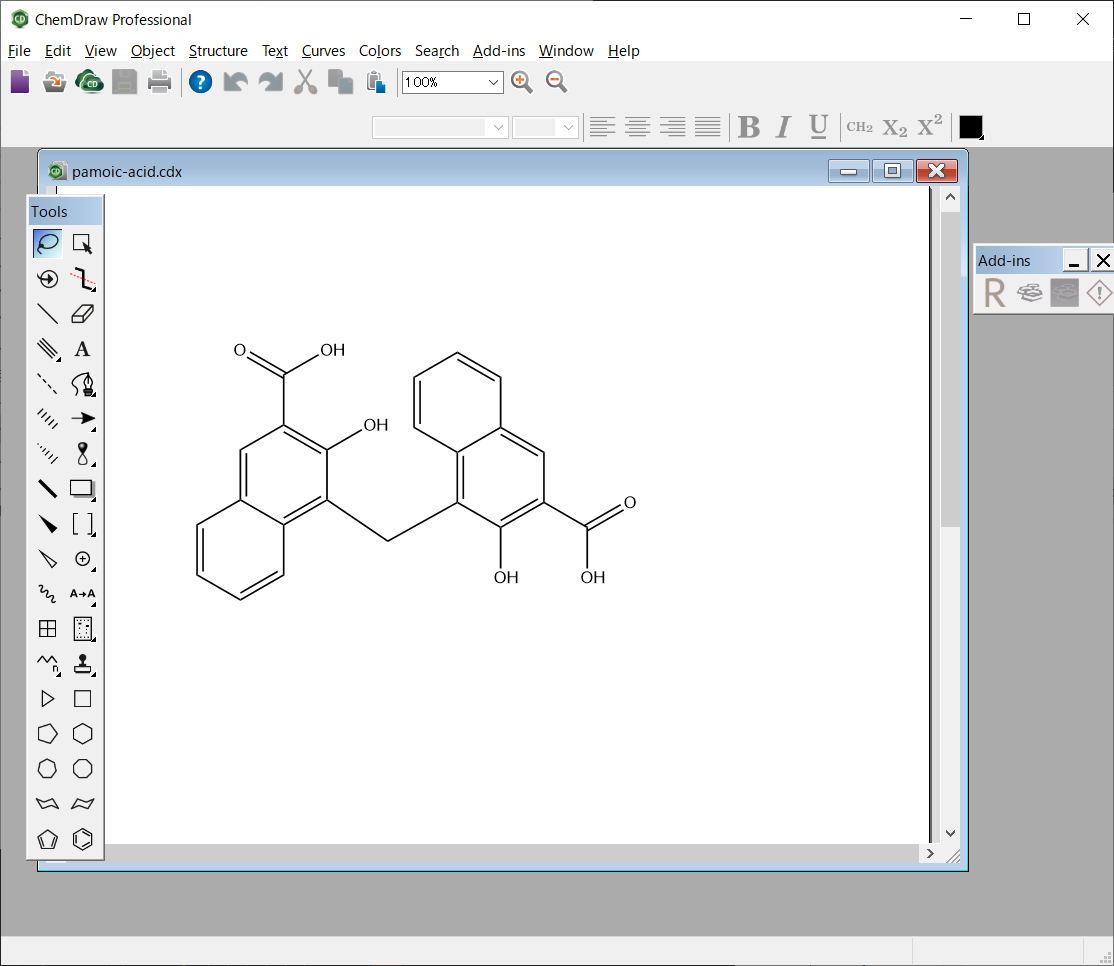
pamoic-acid.mol file
pamoic-acid.mol
ChemDraw10031813162D

 29 32  0  0  0  0  0  0  0  0999 V2000
   -2.1471   -0.8250    0.0000 C   0  0  0  0  0  0  0  0  0  0  0  0
   -1.4326   -0.4125    0.0000 C   0  0  0  0  0  0  0  0  0  0  0  0
   -1.4326    0.4125    0.0000 C   0  0  0  0  0  0  0  0  0  0  0  0
   -2.1471    0.8250    0.0000 C   0  0  0  0  0  0  0  0  0  0  0  0
   -2.8616    0.4125    0.0000 C   0  0  0  0  0  0  0  0  0  0  0  0
   -2.8616   -0.4125    0.0000 C   0  0  0  0  0  0  0  0  0  0  0  0
   -3.5761   -0.8250    0.0000 C   0  0  0  0  0  0  0  0  0  0  0  0
   -3.5761   -1.6500    0.0000 C   0  0  0  0  0  0  0  0  0  0  0  0
   -2.8616   -2.0625    0.0000 C   0  0  0  0  0  0  0  0  0  0  0  0
   -2.1471   -1.6500    0.0000 C   0  0  0  0  0  0  0  0  0  0  0  0
   -0.4294   -1.0931    0.0000 C   0  0  0  0  0  0  0  0  0  0  0  0
    0.7182   -0.4538    0.0000 C   0  0  0  0  0  0  0  0  0  0  0  0
    1.4326   -0.8662    0.0000 C   0  0  0  0  0  0  0  0  0  0  0  0
    2.1471   -0.4538    0.0000 C   0  0  0  0  0  0  0  0  0  0  0  0
    2.1471    0.3712    0.0000 C   0  0  0  0  0  0  0  0  0  0  0  0
    1.4326    0.7837    0.0000 C   0  0  0  0  0  0  0  0  0  0  0  0
    0.7182    0.3712    0.0000 C   0  0  0  0  0  0  0  0  0  0  0  0
    1.4326    1.6087    0.0000 C   0  0  0  0  0  0  0  0  0  0  0  0
    0.7182    2.0212    0.0000 C   0  0  0  0  0  0  0  0  0  0  0  0
    0.0037    1.6087    0.0000 C   0  0  0  0  0  0  0  0  0  0  0  0
    0.0037    0.7837    0.0000 C   0  0  0  0  0  0  0  0  0  0  0  0
    1.4326   -1.6912    0.0000 O   0  0  0  0  0  0  0  0  0  0  0  0
    2.8616   -0.8663    0.0000 C   0  0  0  0  0  0  0  0  0  0  0  0
    3.5761   -0.4538    0.0000 O   0  0  0  0  0  0  0  0  0  0  0  0
    2.8616   -1.6913    0.0000 O   0  0  0  0  0  0  0  0  0  0  0  0
   -2.1471    1.6500    0.0000 C   0  0  0  0  0  0  0  0  0  0  0  0
   -2.8616    2.0625    0.0000 O   0  0  0  0  0  0  0  0  0  0  0  0
   -1.4326    2.0625    0.0000 O   0  0  0  0  0  0  0  0  0  0  0  0
   -0.7182    0.8250    0.0000 O   0  0  0  0  0  0  0  0  0  0  0  0
  1  2  2  0
  2  3  1  0
  3  4  2  0
  4  5  1  0
  5  6  2  0
  6  1  1  0
  6  7  1  0
  7  8  2  0
  8  9  1  0
  9 10  2  0
 10  1  1  0
  2 11  1  0
 11 12  1  0
 12 13  1  0
 13 14  2  0
 14 15  1  0
 15 16  2  0
 16 17  1  0
 17 12  2  0
 16 18  1  0
 18 19  2  0
 19 20  1  0
 20 21  2  0
 21 17  1  0
 13 22  1  0
 14 23  1  0
 23 24  2  0
 23 25  1  0
  4 26  1  0
 26 27  2  0
 26 28  1  0
  3 29  1  0
M  END
Next, we perform geometry optimization of the single molecule of pamoic acid.
[Running from the Interface]
Open the pamoic-acid.mol file using CONFLEX Interface.
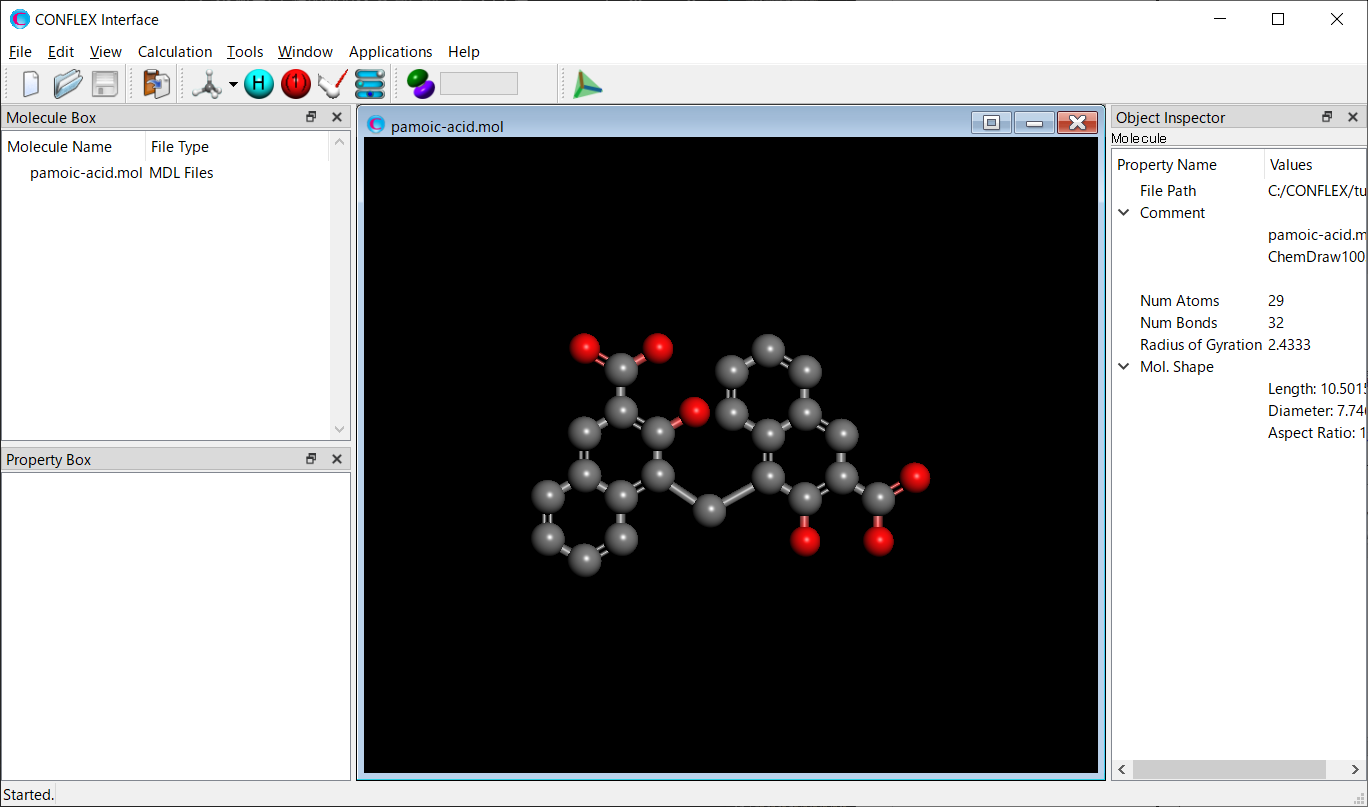
Select [CONFLEX] from the Calculation menu, and then click in the calculation setting dialog that appears. The geometry optimization of II will be started.

[Running from the command line]
Store the pamoic-acid.mol in a folder, and execute the following command. The geometry optimization of pamoic acid will be started. When ini files are not prepared, CONFLEX carries out the optimization of input structure with the default settings.
C:\CONFLEX\bin\conflex-10b.exe -par C:\CONFLEX\par -inp pamoic-acid.molenter
The command above is for Windows OS. For other OS, please refer to [How to execute CONFLEX].
Next, we perform a conformation search of pamoic acid.
[Running from the Interface]
Open the pamoic-acid-F.mol file using CONFLEX Interface.
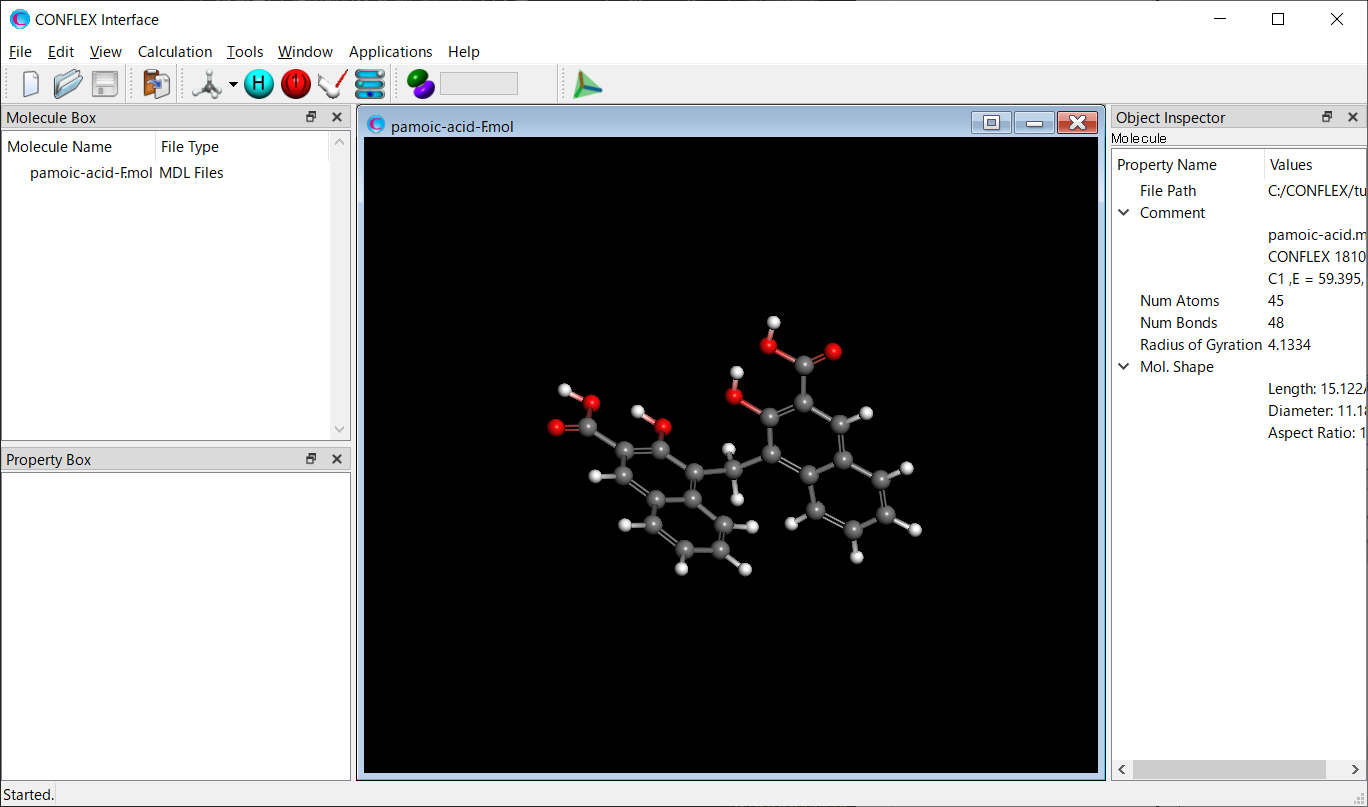
Select [CONFLEX] from the Calculation menu, and select [Conformation Search] from the [Calculation Type:]
pull-down menu on the calculation setting dialog that appears.
Edit the value of [Search Limit:] to 30.0. This parameter is used as a criterion for selecting the initial
structures in the conformation search.
After completing the calculation settings, click to start the
calculation.

[Running from the command line]
The calculation settings are defined by specifying keywords in the pamoic-acid-F.ini file.
pamoic-acid-F.ini file
CONFLEX SEL=30.0
[CONFLEX] means that the conformation search is performed.
[SEL=30.0] means that the search limit, which is used as a criterion for selecting the initial structure in
the conformation search, is set to 30.0 kcal/mol.
Store the two files of pamoic-acid-F.mol and pamoic-acid-F.ini in a single folder, and execute the following command to start the calculation.
C:\CONFLEX\bin\conflex-10b.exe -par C:\CONFLEX\par -inp pamoic-acid-F.molenter
The command above is for Windows OS. For other OS, please refer to [How to execute CONFLEX].
After the conformation search, 118 conformers of pamoic acid are obtained. Here, the third most stable conformer is selected for the crystal structure search calculation. The structural data of the selected conformer is extracted from “pamoic-acid-F.sdf” file and saved as “pamoic-acid-c3.mol”. The “pamoic-acid-F.sdf” file is located in the same folder as the “pamoic-acid-F.mol”.
pamoic-acid-c3.mol file
pamoic-acid.mol
CONFLEX 18102311013D 1   1.00000    57.28062    16
C2  ,E =      57.281, G = 0.144E-07, P =   4.5793, M( 0), IFN =00000003-00000016
 45 48  0     0               999 V2000
   -1.3167    2.0796   -0.8640 C   0  0  0  0  0
   -0.1166    1.2932   -0.8876 C   0  0  0  0  0
    1.0079    1.7433   -0.1606 C   0  0  0  0  0
    0.9563    2.9081    0.6175 C   0  0  0  0  0
   -0.2214    3.6554    0.6552 C   0  0  0  0  0
   -1.3466    3.2641   -0.0791 C   0  0  0  0  0
   -2.5025    4.0623   -0.0282 C   0  0  0  0  0
   -3.6457    3.7218   -0.7444 C   0  0  0  0  0
   -3.6457    2.5743   -1.5200 C   0  0  0  0  0
   -2.5025    1.7708   -1.5777 C   0  0  0  0  0
   -0.0000    0.0000   -1.6979 C   0  0  0  0  0
    0.1166   -1.2932   -0.8876 C   0  0  0  0  0
   -1.0079   -1.7433   -0.1606 C   0  0  0  0  0
   -0.9563   -2.9081    0.6175 C   0  0  0  0  0
    0.2214   -3.6554    0.6552 C   0  0  0  0  0
    1.3466   -3.2641   -0.0791 C   0  0  0  0  0
    1.3167   -2.0796   -0.8640 C   0  0  0  0  0
    2.5025   -4.0623   -0.0282 C   0  0  0  0  0
    3.6457   -3.7218   -0.7444 C   0  0  0  0  0
    3.6457   -2.5743   -1.5200 C   0  0  0  0  0
    2.5025   -1.7708   -1.5777 C   0  0  0  0  0
   -2.1663   -1.0131   -0.2688 O   0  0  0  0  0
   -2.1487   -3.3401    1.3832 C   0  0  0  0  0
   -3.2090   -2.7368    1.4055 O   0  0  0  0  0
   -1.9746   -4.4795    2.0733 O   0  0  0  0  0
    2.1487    3.3401    1.3832 C   0  0  0  0  0
    3.2090    2.7368    1.4055 O   0  0  0  0  0
    1.9746    4.4795    2.0733 O   0  0  0  0  0
    2.1663    1.0131   -0.2688 O   0  0  0  0  0
   -0.2634    4.5620    1.2557 H   0  0  0  0  0
   -2.5220    4.9676    0.5759 H   0  0  0  0  0
   -4.5311    4.3490   -0.6932 H   0  0  0  0  0
   -4.5334    2.2918   -2.0797 H   0  0  0  0  0
   -2.5709    0.8759   -2.1893 H   0  0  0  0  0
   -0.8381   -0.1310   -2.3887 H   0  0  0  0  0
    0.8381    0.1310   -2.3887 H   0  0  0  0  0
    0.2634   -4.5620    1.2557 H   0  0  0  0  0
    2.5220   -4.9676    0.5759 H   0  0  0  0  0
    4.5311   -4.3490   -0.6932 H   0  0  0  0  0
    4.5334   -2.2918   -2.0797 H   0  0  0  0  0
    2.5709   -0.8759   -2.1893 H   0  0  0  0  0
   -2.8489   -1.3798    0.3330 H   0  0  0  0  0
   -2.8335   -4.6307    2.5208 H   0  0  0  0  0
    2.8335    4.6307    2.5208 H   0  0  0  0  0
    2.8489    1.3798    0.3330 H   0  0  0  0  0
  1  2  2  0     0
  2  3  1  0     0
  3  4  2  0     0
  4  5  1  0     0
  5  6  2  0     0
  6  1  1  0     0
  6  7  1  0     0
  7  8  2  0     0
  8  9  1  0     0
  9 10  2  0     0
 10  1  1  0     0
  2 11  1  0     0
 11 12  1  0     0
 12 13  1  0     0
 13 14  2  0     0
 14 15  1  0     0
 15 16  2  0     0
 16 17  1  0     0
 17 12  2  0     0
 16 18  1  0     0
 18 19  2  0     0
 19 20  1  0     0
 20 21  2  0     0
 21 17  1  0     0
 13 22  1  0     0
 14 23  1  0     0
 23 24  2  0     0
 23 25  1  0     0
  4 26  1  0     0
 26 27  2  0     0
 26 28  1  0     0
  3 29  1  0     0
  5 30  1  0     0
  7 31  1  0     0
  8 32  1  0     0
  9 33  1  0     0
 10 34  1  0     0
 11 35  1  0     0
 11 36  1  0     0
 15 37  1  0     0
 18 38  1  0     0
 19 39  1  0     0
 20 40  1  0     0
 21 41  1  0     0
 22 42  1  0     0
 25 43  1  0     0
 28 44  1  0     0
 29 45  1  0     0
M  END
Next, we prepare a diffraction data file for the CONFLEX program from the raw data obtained by the PXRD experiment. Haynes et al. provide the raw data for the pamoic acid crystal. Here, we use “cv6632Isup2.rtv” to create a reference diffraction data file, pamoic-acid-c3.xrd, as shown below.
pamoic-acid-c3.xrd file
Co
8.010 79.990 0.01 7199
8.010    0.000000
8.020    0.000000
8.030    0.000000
8.040    91.252560
8.050    9.827270
8.060    0.000000
(中略)
79.970    43.877350
79.980    17.738100
79.990    42.620530
The first row indicates the type of X-ray source, and the second row shows the range and step of 2-theta, as well as the total number of diffraction data points. In the first row, you can also set the wavelength of the X-ray source, rather than the atomic name characters. The diffraction data are shown in the third row and subsequent rows. The intensity data at each 2-theta point are generated by subtracting the "_pd_proc_intensity_bkg_calc" value from the "_pd_meas_counts_total" value. If the resulting intensity is negative due to the subtraction, it is set to “zero” for that point. You can find the pamoic-acid-c3.xrd file in the Sample_Files folder located in the directory where CONFLEX is installed (Sample_Files\CONFLEX\crystal\powder\pamoic-acid-c3.xrd). Do not include blank lines in the xrd file, and make sure to remove the background from the raw data before using it in CONFLEX.
Finally, we perform a crystal structure search for pamoic acid
[Running from the Interface]
Open the pamoic-acid-c3.mol file using CONFLEX Interface.
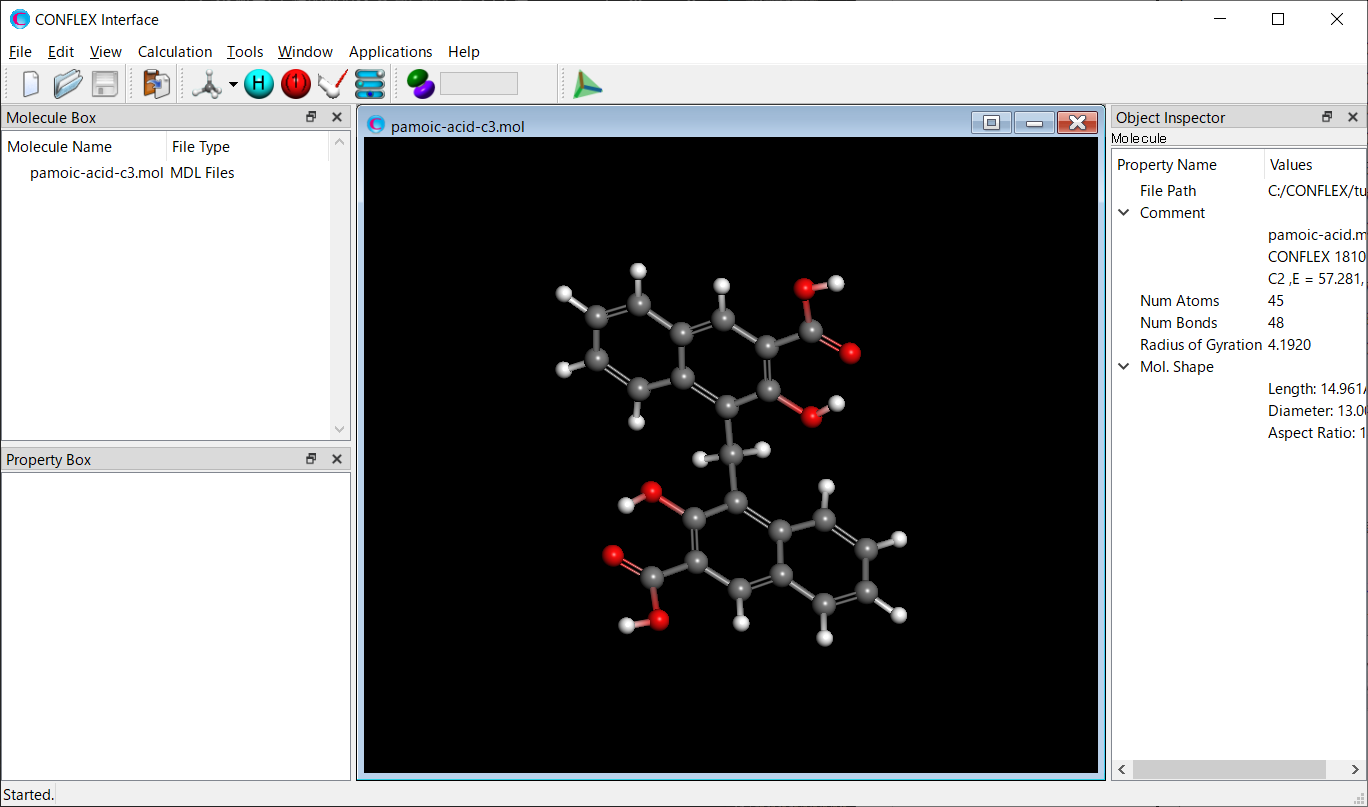
Select [CONFLEX] from the Calculation menu, and then click
in the calculation setting dialog that appears. A detailed settings dialog will be displayed.

To perform the crystal structure search, in [General Settings] dialog of the detailed settings dialog, select [Crystal Search] from the pull-down menu of [Calculation Type:].
The method of crystal structure optimization is [ALL] by default. You can change the type of crystal structure
optimization by the pull-down menu of [Crystal optimization:] in [Crystal Calculation] dialog.
In this dialog, you can also change settings for calculating intermolecular interactions such as the cutoff
distance and the method for calculating Coulombic interactions, and other related parameters.
Next, we configure the parameters for the crystal structure search using the [Crystal Search] dialog.
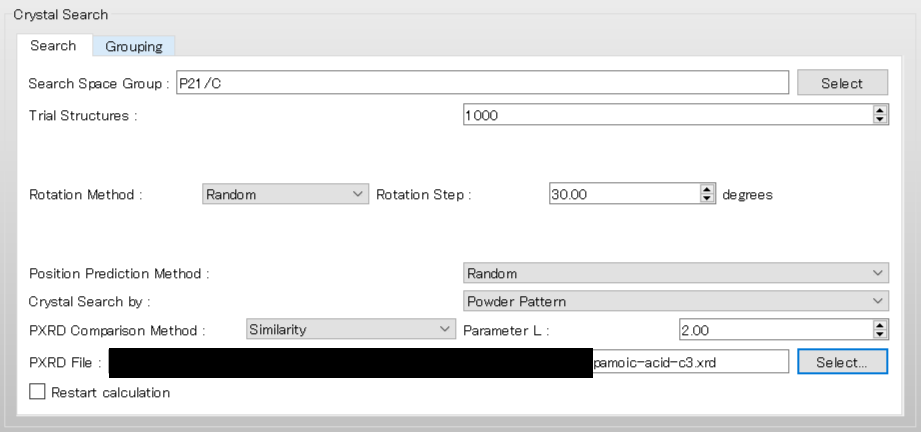
To use the space group P21/c, edit the [Search Space Group:] field from “P21/C,P212121” to “P21/C”. The [Rotation Method:] and [Position Prediction Method:] are used to determine the initial molecular orientation and position, respectively. Here, both methods are set to [Random]. The [Trial Structures:] defines the number of trial structures created for the search. Here, the number of trial structures is set to 1000.
Next, change the pull-down menu for “Crystal Search by:” from [Energy] to [Powder Pattern]. With this setting, the crystal structures found from the search are evaluated based on the similarity of their PXRD patterns to the PXRD pattern of experimental structure. Finally, click of [PXRD File:], and select the “pamoic-acid-c3.xrd” file that was prepared earlier.
After completing the calculation settings, click to start the calculation.
[Running from the command line]
The calculation settings are defined by specifying keywords in the pamoic-acid-c3.ini.
pamoic-acid-c3.ini file
CRYSTAL_SEARCH
CSP_SEARCH=POWDER_PATTERN
CSP_SPGP=(P21/C)
CSP_AUS_MODE=RANDOM
CSP_ROT_MODE=RANDOM
CSP_MAX_CRYSTAL=1000
CRYSTAL_OPTIMIZATION=ALL
[CRYSTAL_SEARCH] indicates that a crystal structure search will be executed.
[CSP_SEARCH=POWDER_PATTERN] means that the crystal structures found in the search will be evaluated based on
the similarity of their PXRD patterns to the PXRD pattern of experimental structure.
[CSP_SPGP=P21/C] specifies the use of the space group P21/c in the search.
[CSP_ROT_MODE=RANDOM] and [CSP_AUS_MODE=RANDOM] mean that the initial molecular orientation and position will
be determined randomly.
[CSP_MAX_CRYSTAL=1000] sets the number of trial crystal structures to 1000.
[CRYSTAL_OPTIMIZATION=ALL] specifies that “ALL” crystal structure optimizations will be
applied.
Store the three files of pamoic-acid-c3.mol, pamoic-acid-c3.ini, and pamoic-acid-c3.xrd in a single folder, and execute the following command to start the calculation.
C:\CONFLEX\bin\conflex-10b.exe -par C:\CONFLEX\par -inp pamoic-acid-c3.molenter
The command above is for Windows OS. For other OS, please refer to [How to execute CONFLEX].
Calculation results
After the calculation, a file named pamoic-acid-c3.csp is generated, which provides detailed results of the structure search. When performing the search using reference diffraction data, the section titled [*** PREDICTED CRYSTAL STRUCTURES:] in the pamoic-acid.csp file lists the found crystal structures in order of similarity to the experimental PXRD pattern. The first structure in the list corresponds to the one with the highest similarity to the reference pattern. The structural data of the found crystals are saved in the pamoic-acid-c3-PCS.cif file. PXRD pattern similarity is evaluated usingGelder's method (R. de Gelder et al, J Comput Chem 22: 273–289, 2001.).
 *** PREDICTED CRYSTAL STRUCTURES:

    IDX     CID    E_RNK   R_RNK  PXRD_SIM      CRYST      INTRA     INTER        VOL       DES        A         B         C       ALPHA     BETA      GAMMA     SPGP      NCALMOL   NCALATM    DMAX    NNEV
      6     19       1       1     0.9056      12.3774    59.3730   -46.9957     1829.59   1.4089   20.3676    4.9453   19.2844   90.0000   70.3767   90.0000   P21/C          225     10125    20.00     0
      9    483     134       2     0.8351      24.0764    58.4811   -34.4047     2074.39   1.2427    4.8375   19.5849   22.8573   90.0000  106.6807   90.0000   P21/C          188      8460    20.00     0
     10    260     199       3     0.8276      25.8085    59.1800   -33.3715     1913.69   1.3470    5.0699   25.0663   16.1916   90.0000  111.5615   90.0000   P21/C          204      9180    20.00     0
     11     56      70       4     0.8235      21.4836    61.1121   -39.6285     1929.20   1.3362   12.0076   12.5142   16.0878   90.0000  127.0568   90.0000   P21/C          205      9225    20.00     0
     14    322       3       5     0.8219      14.2830    58.8049   -44.5220     1897.80   1.3583   10.1471    4.8134   39.0029   90.0000   85.0212   90.0000   P21/C          202      9090    20.00     0
     17    367      88       6     0.8182      22.4699    61.5496   -39.0797     1934.61   1.3325   10.3329   20.6152    9.1642   90.0000   82.3239   90.0000   P21/C          197      8865    20.00     0
     18     60     278       7     0.8177      28.4589    58.0370   -29.5781     1981.96   1.3006    4.7838   11.1176   37.2683   90.0000   90.6615   90.0000   P21/C          202      9090    20.00     0
     19    541     142       8     0.8137      24.3246    58.3375   -34.0128     1917.41   1.3444    4.9060   15.6069   33.7231   90.0000   47.9523   90.0000   P21/C          202      9090    20.00     0
     23     20       9       9     0.8133      15.9937    59.4918   -43.4981     1888.43   1.3650   10.3216    9.1532   22.6717   90.0000   61.8423   90.0000   P21/C          197      8865    20.00     0
     29      5      46      10     0.8122      20.3188    58.3402   -38.0214     1945.98   1.3247    4.8345   10.1697   39.5911   90.0000   88.6467   90.0000   P21/C          204      9180    20.00     0
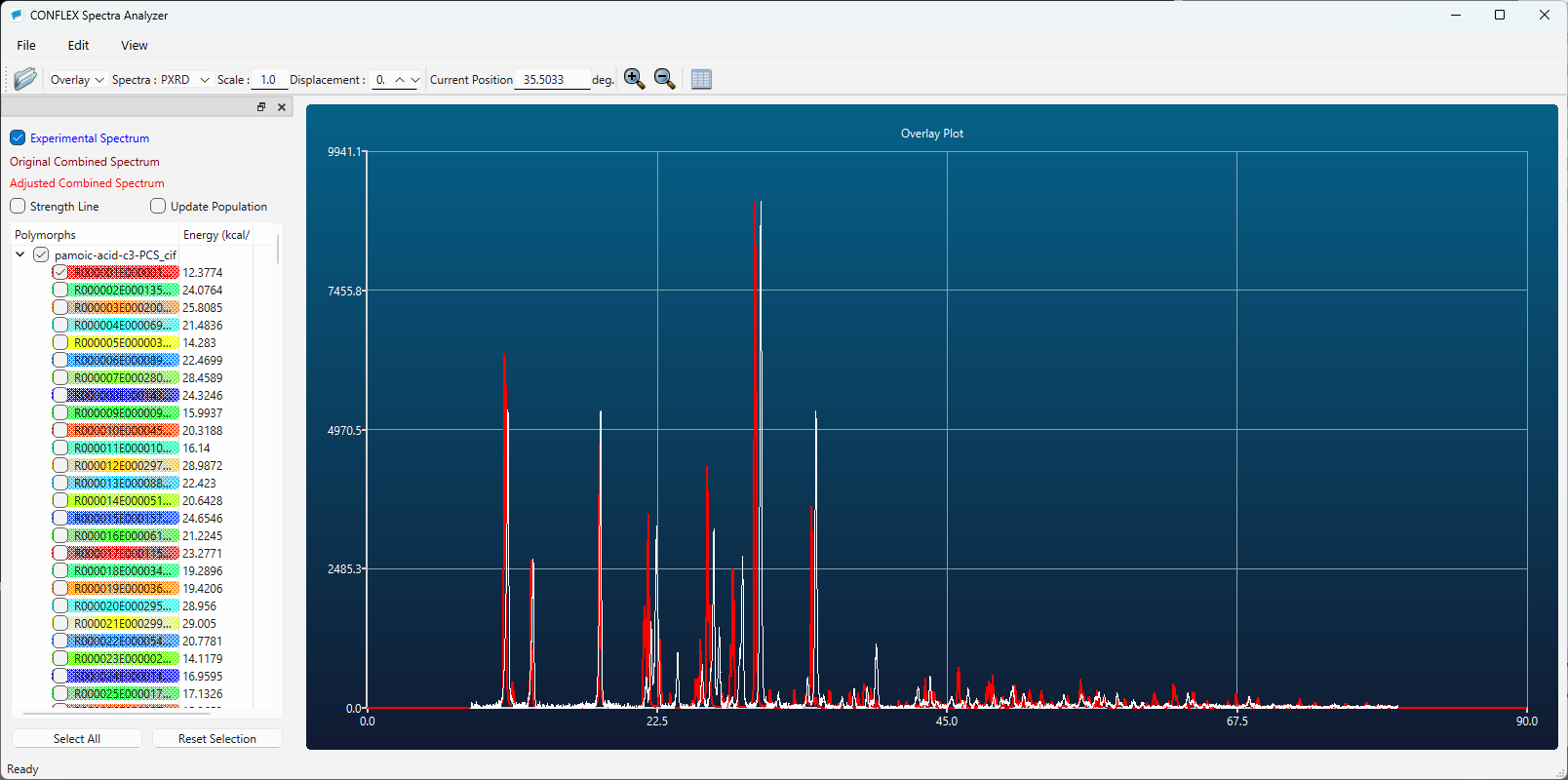
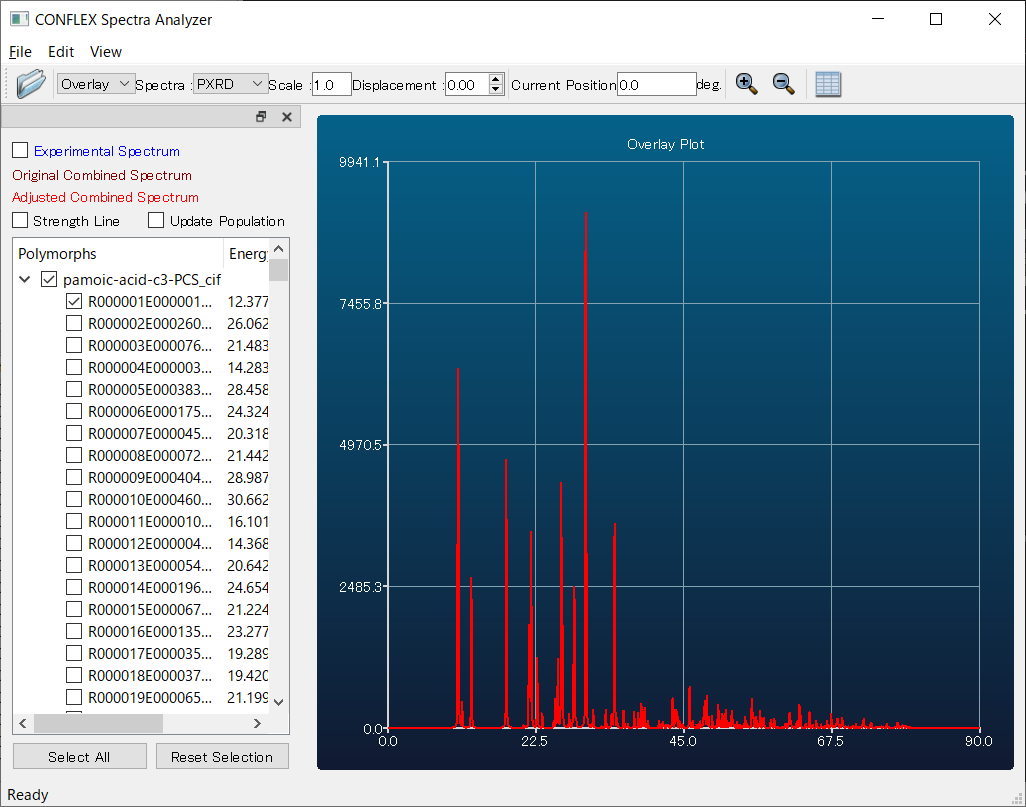
Here, by comparing the diffraction patterns of the first predicted structure (red) and the experimental one (white), you can see that they match well. Therefore, using the first structure as a starting model is expected to make structure refinement via Rietveld analysis much easier compared to performing the refinement without the support of CONFLEX.
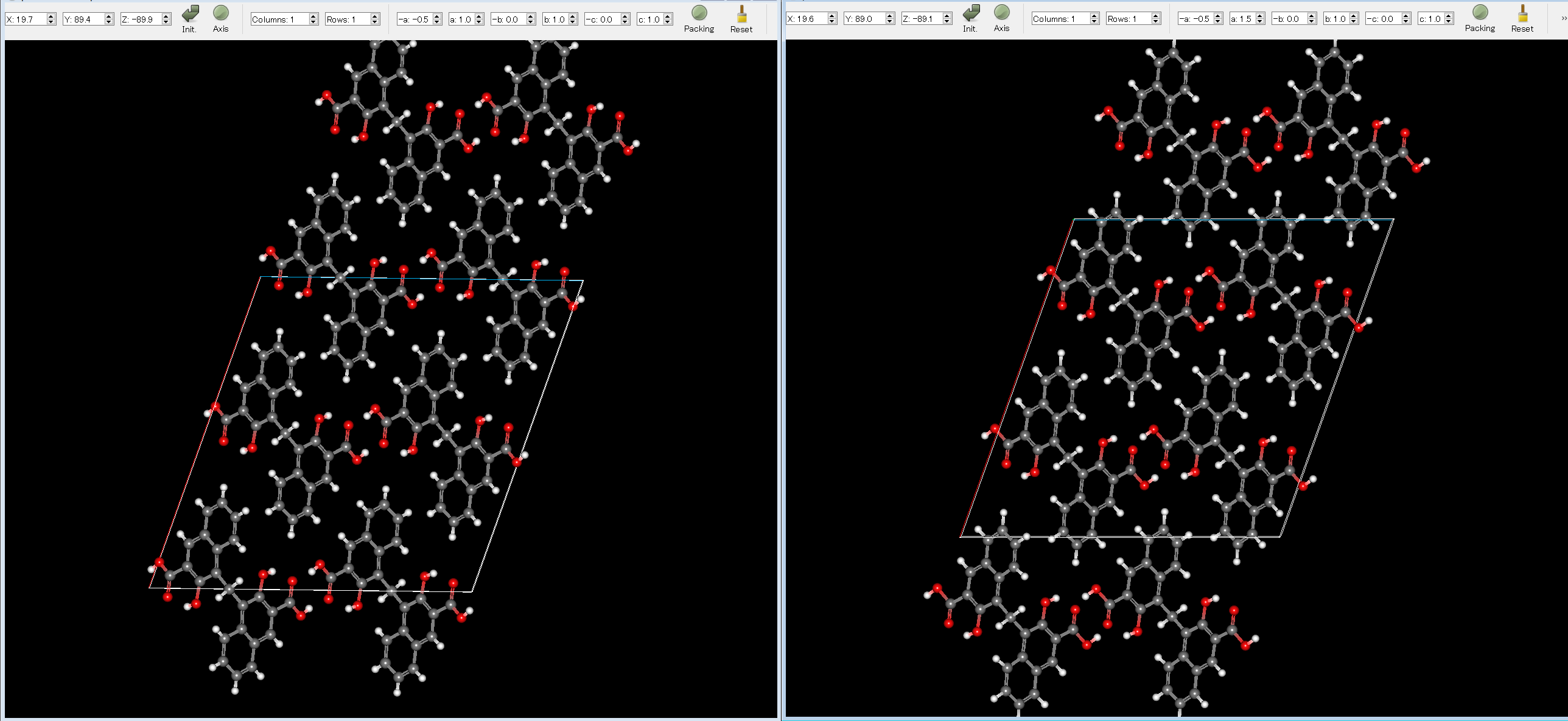
The experimental structure (left) and the first structure (right) are shown below. As you can see, the two structures match well.
[Output files]
After the crystal structure search calculation, the following files are generated.
| File type | Explanation |
|---|---|
| (Input file name).csp | Detailed information about the crystal structure search calculation is provided in this file. |
| (Input file name).cpt | This file contains the information needed to restart the calculation. |
| (Input file name).ical | Powder X-ray diffraction (PXRD) data for the crystal structures identified in the search are provided in this file. The corresponding crystal structure data are described in the -PCS.cif file. |
| (Input file name)-PCS.cif | The crystal structures identified in the search are provided in this file, ordered by crystal energy (or by similarity of PXRD patterns). |
| (Input file name)-FCS.cif | When the optimization of a trial structure is completed during the search process, the optimized structure is saved to this file. This allows you to view the optimized structure even before the entire search calculation is finished. |
In the [*** PREDICTED CRYSTAL STRUCTURES:] section of the csp file, the computationally suggested polymorphs are displayed in order of crystal energy.
 *** PREDICTED CRYSTAL STRUCTURES:

    IDX    CID    E_RNK     CRYST      INTRA      INTER        VOL      DES        A         B         C       ALPHA     BETA      GAMMA     SPGP      NCALMOL   NCALATM    DMAX    NNEV
      4    318      1     -15.7921     4.6942   -20.4864      607.67   1.3663    9.5996    8.3419   10.7545   90.0000   44.8779   90.0000   P21/C          365      4015    20.00     0
     30   5295      2     -15.6634     4.7074   -20.3708      307.00   1.3522   13.4774    7.0951    4.3469   90.0000  132.3915   90.0000   P21            371      4081    20.00     0
    147   3622      3     -15.6125     4.7219   -20.3344      614.28   1.3515    4.3718   19.8181    7.0899   90.0000   90.0000   90.0000   P212121        373      4103    20.00     0
    167   3853      4     -15.6061     4.6925   -20.2986      612.84   1.3547    9.6310    8.3434    7.6267   90.0000   90.0000   90.0000   P212121        325      3575    20.00     0
    178     51      5     -15.5986     4.7162   -20.3147      614.93   1.3501    4.3234    7.1069   21.9413   90.0000  114.1992   90.0000   P21/C          371      4081    20.00     0
    190     90      6     -15.4618     4.7170   -20.1789      618.80   1.3417    4.3746    7.0720   24.0800   90.0000  123.8359   90.0000   P21/C          374      4114    20.00     0
    195   1948      7     -15.3029     4.7145   -20.0173     1222.44   1.3583   14.5999    8.3633   10.4384   90.0000   73.5604   90.0000   C2/C           357      3927    20.00     0
    206    169      8     -15.2948     4.7210   -20.0158      612.95   1.3545    4.0230    8.3785   19.4984   90.0000  111.1490   90.0000   P21/C          358      3938    20.00     0
    229     18      9     -15.2940     4.7263   -20.0203      612.53   1.3554    8.3759   18.2972    8.8552   90.0000   26.8303   90.0000   P21/C          365      4015    20.00     0
    290      4     10     -15.2939     4.7218   -20.0156      612.74   1.3549    8.3793   18.2092    9.2919   90.0000   25.6065   90.0000   P21/C          357      3927    20.00     0
On the other hand, when the crystal structure search is performed using reference diffraction data, the results are listed in order of PXRD pattern similarity.
 *** PREDICTED CRYSTAL STRUCTURES:

    IDX     CID    E_RNK   R_RNK  PXRD_SIM      CRYST      INTRA     INTER        VOL       DES        A         B         C       ALPHA     BETA      GAMMA     SPGP      NCALMOL   NCALATM    DMAX    NNEV
      6     19       1       1     0.9056      12.3774    59.3730   -46.9957     1829.59   1.4089   20.3676    4.9453   19.2844   90.0000   70.3767   90.0000   P21/C          225     10125    20.00     0
      9    483     134       2     0.8351      24.0764    58.4811   -34.4047     2074.39   1.2427    4.8375   19.5849   22.8573   90.0000  106.6807   90.0000   P21/C          188      8460    20.00     0
     10    260     199       3     0.8276      25.8085    59.1800   -33.3715     1913.69   1.3470    5.0699   25.0663   16.1916   90.0000  111.5615   90.0000   P21/C          204      9180    20.00     0
     11     56      70       4     0.8235      21.4836    61.1121   -39.6285     1929.20   1.3362   12.0076   12.5142   16.0878   90.0000  127.0568   90.0000   P21/C          205      9225    20.00     0
     14    322       3       5     0.8219      14.2830    58.8049   -44.5220     1897.80   1.3583   10.1471    4.8134   39.0029   90.0000   85.0212   90.0000   P21/C          202      9090    20.00     0
     17    367      88       6     0.8182      22.4699    61.5496   -39.0797     1934.61   1.3325   10.3329   20.6152    9.1642   90.0000   82.3239   90.0000   P21/C          197      8865    20.00     0
     18     60     278       7     0.8177      28.4589    58.0370   -29.5781     1981.96   1.3006    4.7838   11.1176   37.2683   90.0000   90.6615   90.0000   P21/C          202      9090    20.00     0
     19    541     142       8     0.8137      24.3246    58.3375   -34.0128     1917.41   1.3444    4.9060   15.6069   33.7231   90.0000   47.9523   90.0000   P21/C          202      9090    20.00     0
     23     20       9       9     0.8133      15.9937    59.4918   -43.4981     1888.43   1.3650   10.3216    9.1532   22.6717   90.0000   61.8423   90.0000   P21/C          197      8865    20.00     0
     29      5      46      10     0.8122      20.3188    58.3402   -38.0214     1945.98   1.3247    4.8345   10.1697   39.5911   90.0000   88.6467   90.0000   P21/C          204      9180    20.00     0
The meanings of the items in the [*** PREDICTED CRYSTAL STRUCTURES:] section are shown below.
| Item | Explanation |
|---|---|
| E_RNK | Ranking based on energy |
| R_RNK | Ranking based on PXRD pattern similarity |
| CRYST | Ecrystal |
| INTRA | Eintra |
| INTER | Elattice |
| VOL | Volume of unit cell |
| DES | Density of unit cell |
| A,B,C,ALPHA,BETA,GAMMA | Lattice constants |
| SPGP | Space group |
| NCALMOL | Total number of molecules included in the calculation |
| NCALATM | Total number of atoms included in the calculation |
| DMAX | Cut-off distance |
| NNEV | The number of negative eigenvalues |
* When different cut-off distances are used for vdW and Coulombic interactions, the values of “NCALMOL”, “NCALATM”, and “DMAX” correspond to the calculation of vadW interactions.
The ical file contains the powder X-ray diffraction data for the crystal structures found in the search. The -PCS.cif file contains the crystal structure data corresponding to the PXRD data. The “data_” in the -PCS.cif file and “NAME:” in the ical file correspond to the same structure.
 ------------ SIMULATED POWDER PATTERNS ------------
      CID:   882
     NAME: R000001E000001C000882
    X-RAY: CO (KA1)
     WAVE: 1.78899600
  2*THETA:   8.010 -  79.990 ,   0.010 STEP

   H   K   L  2*THETA       INTENSITY         d
              (DEGREE)                   (ANGSTROME)
   0   0   0    8.010           1.167      0.00000
   0   0   0    8.020           1.174      0.00000
   0   0   0    8.030           1.182      0.00000
   0   0   0    8.040           1.190      0.00000
   0   0   0    8.050           1.197      0.00000
   0   0   0    8.060           1.205      0.00000
   0   0   0    8.070           1.213      0.00000
   0   0   0    8.080           1.221      0.00000
   0   0   0    8.090           1.229      0.00000
   0   0   0    8.100           1.237      0.00000
   0   0   0    8.110           1.246      0.00000
   0   0   0    8.120           1.254      0.00000
   0   0   0    8.130           1.263      0.00000
   0   0   0    8.140           1.271      0.00000
* snip *
[Visualization of search results]
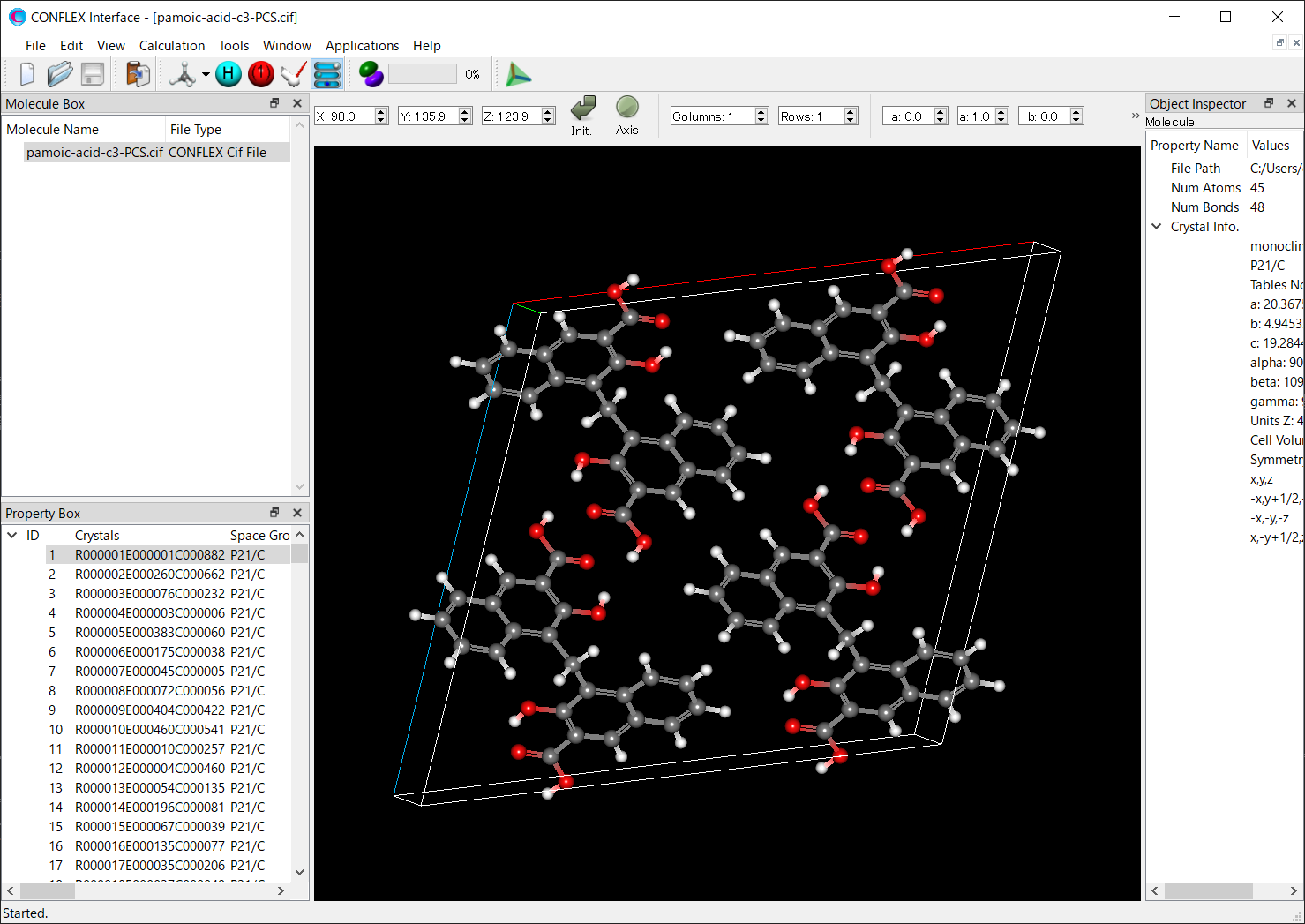
The polymorphs found in the search are saved in the -PCS.cif file. By opening the -PCS.cif file using the CONFLEX Interface, you can view them.
Select [Spectra_Analyzer] from the [Applications] menu with the -PCS file open, and you can also view the PXRD pattern of each structure.
[Restart of crystal structure search]
[Running from the Interface]
Store the molecular structure, ini, and cpt files used in the search calculation in a single folder. If reference diffraction data was used, the xrd file is also required.
Open the molecular structure file using CONFLEX Interface.
Select [CONFLEX] from the Calculation menu, and then click in the calculation setting dialog that appears. A detailed settings dialog will be displayed.
To restart the search calculation, check the [Restart calculation] checkbox at the bottom of the [Crystal Search] dialog in the detailed settings dialog.
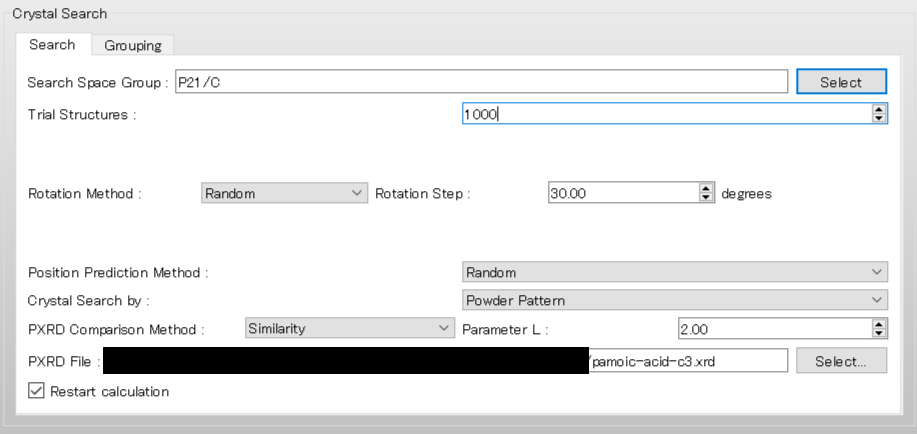
The other settings are automatically loaded from the ini file. When completing the restart settings, click . If you added keywords manually, you should click and add the same keywords when restarting. If the settings for the search calculation do not match, the restart may not be performed correctly.
[Running from the command line]
Store the molecular structure, ini, and cpt files used in the search calculation in a single folder. If reference diffraction data was used, the xrd file is also required. Next, change the extension of the cpt file to “rst” and add the “CSP_RESTART” keyword to the ini file. Note that you should not change the settings for the search calculation in the ini file. If the settings do not match, the restart may not be performed correctly.
When you are ready to restart, execute the following command to start the calculation.
C:\CONFLEX\bin\conflex-10b.exe -par C:\CONFLEX\par -inp (Input file name)enter
The command above is for Windows OS. For other OS, please refer to [How to execute CONFLEX].
[Available space groups]
All 230 space groups are available.
P1, P-1, P2, P21, C2, Pm, Pc, Cm, Cc, P2/m, P21/m, C2/m, P2/c, P21/c, C2/c,
P222, P2221, P21212, P212121, C2221, C222, F222, I222, I212121, Pmm2, Pmc21,
Pcc2, Pma2, Pca21, Pnc2, Pmn21, Pba2, Pna21, Pnn2, Cmm2, Cmc21, Ccc2, Amm2,
Aem2, Ama2, Aea2, Fmm2, Fdd2, Imm2, Iba2, Ima2, Pmmm, Pnnn, Pccm, Pban, Pmma,
Pnna, Pmna, Pcca, Pbam, Pccn, Pbcm, Pnnm, Pmmn, Pbcn, Pbca, Pnma, Cmcm, Cmce,
Cmmm, Cccm, Cmme, Ccce, Fmmm, Fddd, Immm, Ibam, Ibca, Imma, P4, P41, P42, P43,
I4, I41, P-4, I-4, P4/m, P42/m, P4/n, P42/n, I4/m, I41/a, P422, P4212, P4122, P41212,
P4222, P42212, P4322, P43212, I422, I4122, P4mm, P4bm, P42cm, P42nm, P4cc, P4nc, P42mc,
P42bc, I4mm, I4cm, I41md, I41cd, P-42m, P-42c, P-421m, P-421c, P-4m2, P-4c2, P-4b2, P-4n2,
I-4m2, I-4c2, I-42m, I-42d, P4/mmm, P4/mcc, P4/nbm, P4/nnc, P4/mbm, P4/mnc, P4/nmm, P4/ncc,
P42/mmc, P42/mcm, P42/nbc, P42/nnm, P42/mbc, P42/mnm, P42/nmc, P42/ncm, I4/mmm, I4/mcm,
I41/amd, I41/acd, P3, P31, P32, R3, P-3, R-3, P312, P321, P3112, P3121, P3212, P3221, R32,
P3m1, P31m, P3c1, P31c, R3m, R3c, P-31m, P-31c, P-3m1, P-3c1, R-3m, R-3c, P6, P61, P65, P62,
P64, P63, P-6, P6/m, P63/m, P622, P6122, P6522, P6222, P6422, P6322, P6mm, P6cc, P63cm, P63mc,
P-6m2, P-6c2, P-62m, P-62c, P6/mmm, P6/mcc, P63/mcm, P63/mmc, P23, F23, I23, P213, I213, Pm-3,
Pn-3, Fm-3, Fd-3, Im-3, Pa-3, Ia-3, P432, P4232, F432, F4132, I432, P4332, P4132, I4132, P-43m,
F-43m, I-43m, P-43n, F-43c, I-43d, Pm-3m, Pn-3n, Pm-3n, Pn-3m, Fm-3m, Fm-3c, Fd-3m, Fd-3c, Im-3m, Ia-3d